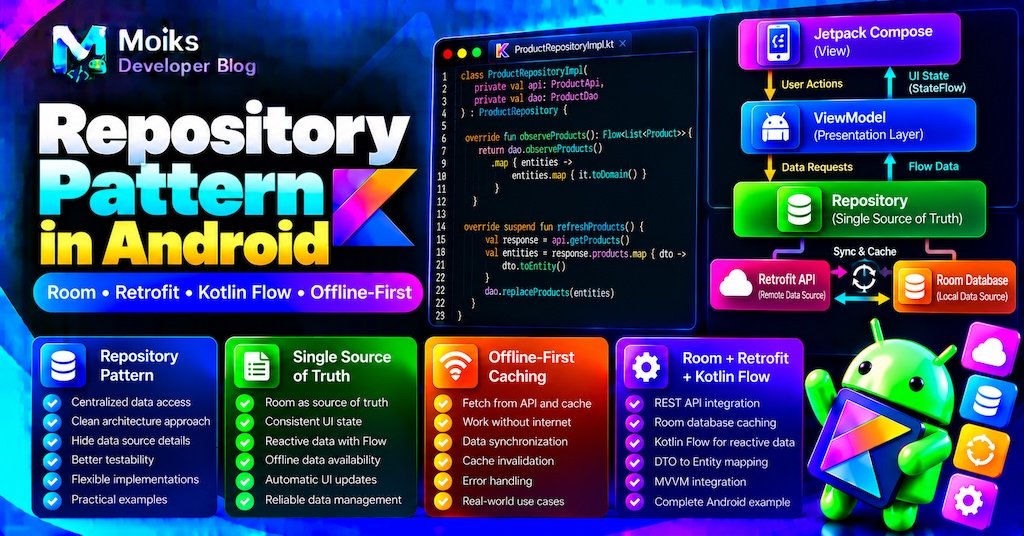
Modern Android applications frequently interact with multiple data sources.
For example, an e-commerce application might retrieve product information from a REST API, cache products in a local Room database, and display the latest available data using Jetpack Compose.
Managing these data sources directly inside Activities, composables, or ViewModels can quickly become complicated.
What happens when the internet connection is unavailable?
How should the application handle cached data?
How can the UI automatically update when the database changes?
How do we avoid duplicate network requests?
These problems can be addressed through a well-designed Repository Pattern.
In this tutorial, we’ll learn how to implement repositories using Kotlin, Room, Retrofit, Coroutines, Flow, MVVM, and Jetpack Compose.
We’ll also build a practical offline-first product catalog.
What You’ll Learn
By the end of this tutorial, you’ll understand:
- What the Repository Pattern is
- Why repositories are important
- Repository interfaces and implementations
- Local and remote data sources
- Single Source of Truth
- Offline-first architecture
- Room database integration
- Retrofit API integration
- Kotlin Flow and reactive data
- Data caching strategies
- Cache invalidation
- Synchronization and error handling
- MVVM integration
- Jetpack Compose integration
- Repository testing
- Production best practices
1. What Is the Repository Pattern?
The Repository Pattern provides a consistent interface for accessing application data.
Instead of allowing ViewModels to communicate directly with Retrofit services or Room DAOs, a repository coordinates those operations.
Without Repository Pattern
ProductViewModel
    |
    +---- Retrofit API
    |
    +---- Room DAO
    |
    +---- Cache Logic
    |
    +---- Error Handling
With Repository Pattern
ProductViewModel
       |
       v
ProductRepository
       |
       +---- Retrofit API
       |
       +---- Room Database
       |
       +---- Synchronization
The ViewModel requests data through the repository.
The repository decides how to obtain and manage that data.
Benefits
- Separation of concerns
- Easier unit testing
- Centralized data management
- Reduced coupling
- Offline support
- Better maintainability
2. Repository Pattern in MVVM Architecture
The Repository Pattern fits naturally into MVVM.
Architecture
+--------------------------------+
|      Jetpack Compose UI        |
+--------------------------------+
               |
               | User Actions
               v
+--------------------------------+
|        ProductViewModel        |
|        StateFlow UI State      |
+--------------------------------+
               |
               v
+--------------------------------+
|       ProductRepository        |
+--------------------------------+
          |           |
          v           v
    Retrofit API   Room Database
Responsibilities
Jetpack Compose
Displays UI and forwards user interactions.
ViewModel
Manages UI state and coordinates loading or refresh operations.
Repository
Provides application data and coordinates its sources.
Remote Data Source
Communicates with network APIs.
Local Data Source
Stores and retrieves cached data.
3. Repository Interfaces vs Implementations
A repository interface defines the operations available to consumers.
Interface
interface ProductRepository {

    fun observeProducts(): Flow<List<Product>>

    suspend fun refreshProducts()
}
Implementation
class ProductRepositoryImpl(
    private val api: ProductApi,
    private val dao: ProductDao
) : ProductRepository {

    override fun observeProducts(): Flow<List<Product>> {
        return dao.observeProducts()
            .map { entities ->
                entities.map { it.toDomain() }
            }
    }

    override suspend fun refreshProducts() {
        // Fetch, validate, and cache remote products.
    }
}
Explanation
The interface describes what the repository provides.
The implementation determines how the operations work.
Best Practice
Use repository interfaces when they improve dependency boundaries, testing, or implementation flexibility.
A separate interface is not mandatory for every small application.
4. What Is a Single Source of Truth?
A Single Source of Truth (SSOT) is the authoritative source from which application state is read.
In many offline-first Android applications, the local Room database serves as the source of truth.
Architecture
        Remote API
            |
            | Fetch
            v
      ProductRepository
            |
            | Save
            v
       Room Database
            |
            | Flow
            v
      ProductViewModel
            |
            | StateFlow
            v
       Jetpack Compose
Explanation
The UI does not display separate network and database product lists.
Instead:
- The repository retrieves remote data.
- Remote data is validated and stored in Room.
- Room emits updated records.
- ViewModel observes the database Flow.
- Jetpack Compose displays the latest local data.
Benefits
- Consistent UI state
- Offline access
- Fewer conflicting data sources
- Reactive updates
- Simpler data flow
Important
Single Source of Truth does not mean an application can only have one data source.
It means the application has a clearly defined authoritative source for a particular kind of data.
5. What Is Offline-First Architecture?
Offline-first architecture prioritizes useful application behavior even when network connectivity is unavailable.
For example, a product catalog can display previously downloaded products while the user is offline.
Offline-First Flow
Application Starts
        |
        v
Read Local Database
        |
        v
Display Cached Products
        |
        v
Attempt Network Refresh
        |
   +----+----+
   |         |
Success    Failure
   |         |
   v         v
Update DB  Keep Cache
   |
   v
UI Updates Automatically
Benefits
- Faster initial data display
- Better experience on unstable networks
- Reduced dependence on continuous connectivity
- Improved reliability
- Consistent reactive UI
Important
Offline-first does not automatically mean every feature works offline.
Actions such as payments, authentication, or server-authoritative transactions may still require network connectivity.
6. Understanding Data Sources
A data source is responsible for communicating with a particular storage or networking system.
Remote Data Source
interface ProductRemoteDataSource {

    suspend fun getProducts(): List<ProductDto>
}
Local Data Source
interface ProductLocalDataSource {

    fun observeProducts(): Flow<List<ProductEntity>>

    suspend fun saveProducts(
        products: List<ProductEntity>
    )
}
Explanation
Remote data sources handle network access.
Local data sources handle database or file operations.
Best Practice
Introduce dedicated data-source abstractions when they simplify complex integrations.
For small applications, repositories may directly use Retrofit services and Room DAOs.
7. Understanding Data Transfer Objects
A Data Transfer Object (DTO) represents data received from or sent to an external service.
Example
@Serializable
data class ProductDto(
    val id: Int,
    val title: String,
    val price: Double,
    val category: String
)
Explanation
The DTO represents the API response.
The remote API determines its field structure.
The rest of the application should not necessarily depend directly on that structure.
8. Understanding Room Entities
Room entities represent database tables.
Example
@Entity(tableName = "products")
data class ProductEntity(

    @PrimaryKey
    val id: Int,

    val name: String,

    val price: Double,

    val category: String
)
Explanation
Room uses the entity to create and manage the products table.
Important
Database entities and remote DTOs serve different purposes.
Separate them when their schemas or responsibilities differ.
9. Mapping DTOs to Database Entities
Data mapping converts one representation into another.
Example
fun ProductDto.toEntity(): ProductEntity {

    return ProductEntity(
        id = id,
        name = title,
        price = price,
        category = category
    )
}
Explanation
The API uses the field title.
The database uses the field name.
The mapper handles the difference.
Benefits
- Clear boundaries
- Flexible API changes
- Easier testing
- Better maintainability
Practical Mini-Project: Offline-First Product Catalog
Now let’s implement a product catalog that supports cached data and network synchronization.
Features
- Fetch products from a REST API
- Store products in Room
- Display cached products offline
- Observe database updates using Flow
- Refresh products manually
- Show synchronization errors
- Keep cached data after network failure
- Use MVVM and Jetpack Compose
Technology Stack
- Kotlin
- Jetpack Compose
- Material 3
- Room
- Retrofit
- Kotlin Serialization
- Coroutines
- Flow
- StateFlow
- ViewModel
For demonstration, we’ll use a sample product API. The response format must match the selected API endpoint.
10. Recommended Project Structure
com.example.offlineproducts/
│
├── data/
│   ├── local/
│   │   ├── ProductEntity.kt
│   │   ├── ProductDao.kt
│   │   └── AppDatabase.kt
│   │
│   ├── remote/
│   │   ├── ProductDto.kt
│   │   ├── ProductResponse.kt
│   │   └── ProductApi.kt
│   │
│   ├── mapper/
│   │   └── ProductMapper.kt
│   │
│   └── repository/
│       └── ProductRepositoryImpl.kt
│
├── domain/
│   ├── model/
│   │   └── Product.kt
│   │
│   └── repository/
│       └── ProductRepository.kt
│
├── presentation/
│   └── products/
│       ├── ProductUiState.kt
│       ├── ProductViewModel.kt
│       └── ProductScreen.kt
│
└── MainActivity.kt
This is a single-module project organized into logical packages.
11. Add Required Dependencies
Create an Empty Activity project with Jetpack Compose enabled.
In your app-level Gradle configuration, add the required dependencies.
dependencies {

    // Room
    implementation(libs.androidx.room.runtime)
    implementation(libs.androidx.room.ktx)
    ksp(libs.androidx.room.compiler)

    // Retrofit
    implementation(libs.retrofit)
    implementation(libs.retrofit.kotlinx.serialization)

    // Kotlin Serialization
    implementation(libs.kotlinx.serialization.json)

    // Coroutines
    implementation(libs.kotlinx.coroutines.android)

    // ViewModel
    implementation(libs.androidx.lifecycle.viewmodel.ktx)
    implementation(libs.androidx.lifecycle.viewmodel.compose)

    // Lifecycle-aware Compose
    implementation(libs.androidx.lifecycle.runtime.compose)

    // Jetpack Compose
    implementation(libs.androidx.compose.material3)
}
These are illustrative version-catalog aliases.
Configure matching entries in gradle/libs.versions.toml, use compatible stable library versions, and apply the Kotlin Serialization and KSP plugins.
For Retrofit, use a converter compatible with kotlinx.serialization.
Internet Permission
Add the following permission to AndroidManifest.xml:
<uses-permission android:name="android.permission.INTERNET" />12. Create the Domain Model
File: domain/model/Product.kt
package com.example.offlineproducts.domain.model

data class Product(
    val id: Int,
    val name: String,
    val price: Double,
    val category: String
)
Explanation
This class represents the product used by application logic and presentation.
It does not depend on Retrofit or Room.
13. Create the Room Entity
File: data/local/ProductEntity.kt
package com.example.offlineproducts.data.local

import androidx.room.Entity
import androidx.room.PrimaryKey

@Entity(tableName = "products")
data class ProductEntity(

    @PrimaryKey
    val id: Int,

    val name: String,

    val price: Double,

    val category: String
)
Explanation
Each ProductEntity corresponds to a row in the products table.
14. Create the Product DAO
File: data/local/ProductDao.kt
package com.example.offlineproducts.data.local

import androidx.room.Dao
import androidx.room.Insert
import androidx.room.OnConflictStrategy
import androidx.room.Query
import androidx.room.Transaction
import kotlinx.coroutines.flow.Flow

@Dao
interface ProductDao {

    @Query("SELECT * FROM products ORDER BY name ASC")
    fun observeProducts(): Flow<List<ProductEntity>>

    @Insert(onConflict = OnConflictStrategy.REPLACE)
    suspend fun insertProducts(
        products: List<ProductEntity>
    )

    @Query("DELETE FROM products")
    suspend fun deleteAllProducts()

    @Transaction
    suspend fun replaceProducts(
        products: List<ProductEntity>
    ) {
        deleteAllProducts()
        insertProducts(products)
    }
}
Explanation
observeProducts() returns a Flow.
Whenever the products table changes, Room can emit an updated result.
replaceProducts() performs deletion and insertion within a transaction.
Important
This example assumes the API returns the complete product collection.
For paginated or partial responses, do not replace the entire table with a partial result.
15. Create the Room Database
File: data/local/AppDatabase.kt
package com.example.offlineproducts.data.local

import androidx.room.Database
import androidx.room.RoomDatabase

@Database(
    entities = [ProductEntity::class],
    version = 1,
    exportSchema = true
)
abstract class AppDatabase : RoomDatabase() {

    abstract fun productDao(): ProductDao
}
Explanation
AppDatabase provides access to ProductDao.
In production, configure Room schema export and database migrations as your schema evolves.
16. Create the Remote DTO
For this tutorial, we’ll use the DummyJSON products API.
Example endpoint:
Product DTO
File: data/remote/ProductDto.kt
package com.example.offlineproducts.data.remote

import kotlinx.serialization.Serializable

@Serializable
data class ProductDto(
    val id: Int,
    val title: String,
    val price: Double,
    val category: String
)
Response Model
File: data/remote/ProductResponse.kt
package com.example.offlineproducts.data.remote

import kotlinx.serialization.Serializable

@Serializable
data class ProductResponse(
    val products: List<ProductDto>
)
Explanation
The API returns an object containing a products array.
Kotlin Serialization converts the JSON response into Kotlin objects.
17. Create the Retrofit API
File: data/remote/ProductApi.kt
package com.example.offlineproducts.data.remote

import retrofit2.http.GET

interface ProductApi {

    @GET("products?limit=20")
    suspend fun getProducts(): ProductResponse
}
Explanation
Retrofit performs the HTTP request and converts the response through the configured converter.
18. Create Data Mappers
File: data/mapper/ProductMapper.kt
package com.example.offlineproducts.data.mapper

import com.example.offlineproducts.data.local.ProductEntity
import com.example.offlineproducts.data.remote.ProductDto
import com.example.offlineproducts.domain.model.Product

fun ProductDto.toEntity(): ProductEntity {

    return ProductEntity(
        id = id,
        name = title,
        price = price,
        category = category
    )
}

fun ProductEntity.toDomain(): Product {

    return Product(
        id = id,
        name = name,
        price = price,
        category = category
    )
}
Explanation
The remote DTO is converted into a Room entity.
The Room entity is converted into a domain model.
This keeps API and database implementation details outside the domain model.
19. Create the Repository Interface
File: domain/repository/ProductRepository.kt
package com.example.offlineproducts.domain.repository

import com.example.offlineproducts.domain.model.Product
import kotlinx.coroutines.flow.Flow

interface ProductRepository {

    fun observeProducts(): Flow<List<Product>>

    suspend fun refreshProducts()
}
Explanation
The repository exposes two operations:
- Observe cached products
- Refresh products from the network
The UI does not need to know how synchronization works.
20. Create the Repository Implementation
File: data/repository/ProductRepositoryImpl.kt
package com.example.offlineproducts.data.repository

import com.example.offlineproducts.data.local.ProductDao
import com.example.offlineproducts.data.mapper.toDomain
import com.example.offlineproducts.data.mapper.toEntity
import com.example.offlineproducts.data.remote.ProductApi
import com.example.offlineproducts.domain.model.Product
import com.example.offlineproducts.domain.repository.ProductRepository

import kotlinx.coroutines.flow.Flow
import kotlinx.coroutines.flow.map

class ProductRepositoryImpl(
    private val api: ProductApi,
    private val dao: ProductDao
) : ProductRepository {

    override fun observeProducts(): Flow<List<Product>> {

        return dao.observeProducts()
            .map { entities ->

                entities.map { entity ->
                    entity.toDomain()
                }
            }
    }

    override suspend fun refreshProducts() {

        val response = api.getProducts()

        val entities = response.products.map { dto ->
            dto.toEntity()
        }

        dao.replaceProducts(entities)
    }
}
Explanation
The repository coordinates the API and database.
When refreshProducts() succeeds:
- Retrofit fetches products.
- DTOs are converted into Room entities.
- Room replaces the cached products in a transaction.
- Room emits the updated list.
- The UI receives the latest data.
Offline Behavior
If the network request fails before the database transaction, the previously cached products remain available.
The repository allows the exception to propagate so the ViewModel can display a refresh error.
21. Understanding Cache Synchronization
A cache stores data locally to reduce repeated network access and support offline functionality.
Common Cache Strategies
| Strategy | Behavior |
|---|---|
| Network-first | Try network, fall back to cache |
| Cache-first | Use cache when available, otherwise fetch |
| Stale-while-revalidate | Display cache immediately and refresh in background |
| Offline-first | Design reads and supported operations around local availability |
Our product catalog follows a basic stale-while-revalidate approach.
The UI observes Room while a network refresh updates the database.
Important
The example does not yet implement time-based cache expiration.
Production applications may track:
- Last successful synchronization
- Data freshness requirements
- Retry attempts
- Synchronization status
- Pagination state
22. Create the UI State
File: presentation/products/ProductUiState.kt
package com.example.offlineproducts.presentation.products

import com.example.offlineproducts.domain.model.Product

data class ProductUiState(
    val products: List<Product> = emptyList(),
    val isLoading: Boolean = true,
    val isRefreshing: Boolean = false,
    val errorMessage: String? = null
)
Why Use a Data Class?
Offline-first screens often need to display multiple conditions simultaneously.
For example:
- Cached products are visible.
- A refresh is running.
- A network error occurs.
- Existing data remains available.
A single Loading/Success/Error sealed state can be restrictive for these scenarios.
A data class supports combinations of UI conditions.
23. Create the Product ViewModel
File: presentation/products/ProductViewModel.kt
package com.example.offlineproducts.presentation.products

import androidx.lifecycle.ViewModel
import androidx.lifecycle.viewModelScope

import com.example.offlineproducts.domain.repository.ProductRepository

import kotlinx.coroutines.CancellationException
import kotlinx.coroutines.Job
import kotlinx.coroutines.flow.MutableStateFlow
import kotlinx.coroutines.flow.StateFlow
import kotlinx.coroutines.flow.asStateFlow
import kotlinx.coroutines.flow.update
import kotlinx.coroutines.launch

class ProductViewModel(
    private val repository: ProductRepository
) : ViewModel() {

    private val _uiState =
        MutableStateFlow(ProductUiState())

    val uiState: StateFlow<ProductUiState> =
        _uiState.asStateFlow()

    private var refreshJob: Job? = null

    init {
        observeProducts()
        refreshProducts()
    }

    private fun observeProducts() {

        viewModelScope.launch {

            repository.observeProducts()
                .collect { products ->

                    _uiState.update { state ->

                        state.copy(
                            products = products,
                            isLoading = false
                        )
                    }
                }
        }
    }

    fun refreshProducts() {

        if (refreshJob?.isActive == true) {
            return
        }

        refreshJob = viewModelScope.launch {

            _uiState.update {
                it.copy(
                    isRefreshing = true,
                    errorMessage = null
                )
            }

            try {

                repository.refreshProducts()

            } catch (exception: CancellationException) {

                throw exception

            } catch (exception: Exception) {

                _uiState.update {
                    it.copy(
                        errorMessage =
                            "Unable to refresh. Showing cached data."
                    )
                }

            } finally {

                _uiState.update {
                    it.copy(
                        isRefreshing = false
                    )
                }
            }
        }
    }
}
Explanation
The ViewModel performs two independent operations.
Database Observation
observeProducts() collects Room updates.
Network Synchronization
refreshProducts() attempts to download the latest products.
If synchronization fails, existing cached products remain visible.
Best Practice
Avoid cancelling long-lived database observation when starting a refresh.
Database observation and synchronization are separate responsibilities.
24. Create the Jetpack Compose Screen
File: presentation/products/ProductScreen.kt
package com.example.offlineproducts.presentation.products

import androidx.compose.foundation.layout.*
import androidx.compose.foundation.lazy.LazyColumn
import androidx.compose.foundation.lazy.items
import androidx.compose.material3.*
import androidx.compose.runtime.*
import androidx.compose.ui.Alignment
import androidx.compose.ui.Modifier
import androidx.compose.ui.unit.dp

import androidx.lifecycle.compose.collectAsStateWithLifecycle

import com.example.offlineproducts.domain.model.Product

@OptIn(ExperimentalMaterial3Api::class)
@Composable
fun ProductScreen(
    viewModel: ProductViewModel
) {

    val state by viewModel.uiState
        .collectAsStateWithLifecycle()

    Scaffold(
        topBar = {

            TopAppBar(
                title = {
                    Text("Offline Product Catalog")
                }
            )
        }
    ) { paddingValues ->

        Column(
            modifier = Modifier
                .fillMaxSize()
                .padding(paddingValues)
        ) {

            Row(
                modifier = Modifier
                    .fillMaxWidth()
                    .padding(16.dp),
                horizontalArrangement =
                    Arrangement.SpaceBetween,
                verticalAlignment =
                    Alignment.CenterVertically
            ) {

                Text(
                    text = "Products",
                    style = MaterialTheme.typography.titleLarge
                )

                Button(
                    onClick = viewModel::refreshProducts,
                    enabled = !state.isRefreshing
                ) {

                    Text(
                        if (state.isRefreshing) {
                            "Refreshing..."
                        } else {
                            "Refresh"
                        }
                    )
                }
            }

            if (state.isRefreshing) {

                LinearProgressIndicator(
                    modifier = Modifier.fillMaxWidth()
                )
            }

            state.errorMessage?.let { message ->

                Text(
                    text = message,
                    color = MaterialTheme.colorScheme.error,
                    modifier = Modifier.padding(16.dp)
                )
            }

            Box(
                modifier = Modifier.fillMaxSize()
            ) {

                when {

                    state.isLoading -> {

                        CircularProgressIndicator(
                            modifier = Modifier.align(
                                Alignment.Center
                            )
                        )
                    }

                    state.products.isEmpty() -> {

                        Text(
                            text = "No products available",
                            modifier = Modifier.align(
                                Alignment.Center
                            )
                        )
                    }

                    else -> {

                        LazyColumn(
                            contentPadding = PaddingValues(16.dp),
                            verticalArrangement =
                                Arrangement.spacedBy(12.dp)
                        ) {

                            items(
                                items = state.products,
                                key = { it.id }
                            ) { product ->

                                ProductCard(product)
                            }
                        }
                    }
                }
            }
        }
    }
}

@Composable
fun ProductCard(
    product: Product
) {

    Card(
        modifier = Modifier.fillMaxWidth()
    ) {

        Column(
            modifier = Modifier.padding(16.dp),
            verticalArrangement =
                Arrangement.spacedBy(8.dp)
        ) {

            Text(
                text = product.name,
                style = MaterialTheme.typography.titleMedium
            )

            Text(
                text = product.category
            )

            Text(
                text = "₹${product.price}",
                color = MaterialTheme.colorScheme.primary
            )
        }
    }
}
Explanation
The UI observes StateFlow using collectAsStateWithLifecycle().
Cached products remain visible while a refresh is running.
If a network request fails, an error message appears without removing existing products.
25. Configure Retrofit and Room
For this tutorial, we’ll use manual dependency injection.
Retrofit Setup
val json = Json {
    ignoreUnknownKeys = true
}

val retrofit = Retrofit.Builder()
    .baseUrl("https://dummyjson.com/")
    .addConverterFactory(
        json.asConverterFactory(
            "application/json".toMediaType()
        )
    )
    .build()

val api = retrofit.create(ProductApi::class.java)
Room Setup
val database = Room.databaseBuilder(
    applicationContext,
    AppDatabase::class.java,
    "products_database"
).build()

val dao = database.productDao()
Repository Setup
val repository = ProductRepositoryImpl(
    api = api,
    dao = dao
)
Important
Retrofit, Room, and repository instances should generally be shared rather than recreated for every screen.
For production applications, use application-level dependency management such as Hilt.
26. Create the ViewModel Factory
class ProductViewModelFactory(
    private val repository: ProductRepository
) : ViewModelProvider.Factory {

    override fun <T : ViewModel> create(
        modelClass: Class<T>
    ): T {

        if (
            modelClass.isAssignableFrom(
                ProductViewModel::class.java
            )
        ) {

            @Suppress("UNCHECKED_CAST")
            return ProductViewModel(repository) as T
        }

        throw IllegalArgumentException(
            "Unknown ViewModel class"
        )
    }
}
Explanation
The factory injects ProductRepository into ProductViewModel.
27. Create MainActivity
class MainActivity : ComponentActivity() {

    override fun onCreate(
        savedInstanceState: Bundle?
    ) {

        super.onCreate(savedInstanceState)

        val json = Json {
            ignoreUnknownKeys = true
        }

        val retrofit = Retrofit.Builder()
            .baseUrl("https://dummyjson.com/")
            .addConverterFactory(
                json.asConverterFactory(
                    "application/json".toMediaType()
                )
            )
            .build()

        val api = retrofit.create(ProductApi::class.java)

        val database = Room.databaseBuilder(
            applicationContext,
            AppDatabase::class.java,
            "products_database"
        ).build()

        val repository = ProductRepositoryImpl(
            api = api,
            dao = database.productDao()
        )

        val factory = ProductViewModelFactory(repository)

        setContent {

            MaterialTheme {

                val viewModel: ProductViewModel =
                    viewModel(factory = factory)

                ProductScreen(viewModel)
            }
        }
    }
}
Explanation
MainActivity configures the application dependencies and displays the Compose screen.
This is intentionally simple for educational purposes.
For production, move shared dependency construction into an application-level container or Hilt configuration.
28. Expected Application UI
First Launch
+--------------------------------+
|      Offline Product Catalog   |
|                                |
| Products             [Refresh] |
|                                |
|              ○                 |
|                                |
|        Loading products...     |
+--------------------------------+
Products Loaded
+--------------------------------+
|      Offline Product Catalog   |
|                                |
| Products             [Refresh] |
|                                |
| +----------------------------+ |
| | Essence Mascara            | |
| | beauty                     | |
| | ₹9.99                      | |
| +----------------------------+ |
|                                |
| +----------------------------+ |
| | Eyeshadow Palette          | |
| | beauty                     | |
| | ₹19.99                     | |
| +----------------------------+ |
|                                |
+--------------------------------+
Offline with Cached Products
+--------------------------------+
|      Offline Product Catalog   |
|                                |
| Products             [Refresh] |
|                                |
| Unable to refresh.             |
| Showing cached data.           |
|                                |
| +----------------------------+ |
| | Essence Mascara            | |
| | beauty                     | |
| | ₹9.99                      | |
| +----------------------------+ |
|                                |
+--------------------------------+
Explanation
Previously cached products remain visible even if the network is unavailable.
29. Understanding Cache Invalidation
Cached data eventually becomes outdated.
Cache invalidation determines when data should be refreshed or replaced.
Common Approaches
Time-Based Expiration
Refresh data after a specified duration.
User-Initiated Refresh
Refresh when the user taps a button.
Event-Based Invalidation
Refresh when a relevant application event occurs.
Server-Driven Updates
Refresh based on server notifications or synchronization signals.
Example
fun shouldRefresh(
    lastSyncTime: Long,
    currentTime: Long
): Boolean {

    val cacheDuration = 15 * 60 * 1000L

    return currentTime - lastSyncTime > cacheDuration
}
Explanation
The function checks whether more than 15 minutes have passed since the previous synchronization.
Best Practice
Use a reliable time source and handle clock changes appropriately.
For persisted timestamps, use a clearly defined timestamp representation.
30. Handling Network Failures
Network requests can fail for many reasons.
Examples include:
- No internet connection
- Connection timeout
- Server errors
- Invalid responses
- Authentication failure
Example
suspend fun refreshSafely(
    repository: ProductRepository
): Result<Unit> {

    return try {

        repository.refreshProducts()

        Result.success(Unit)

    } catch (exception: CancellationException) {

        throw exception

    } catch (exception: Exception) {

        Result.failure(exception)
    }
}
Explanation
The function converts ordinary failures into Result values while preserving coroutine cancellation.
Best Practice
Do not delete cached data simply because a network request fails.
31. Repository Pattern with Kotlin Flow
Kotlin Flow is especially useful for reactive data access.
Example
fun observeProducts(): Flow<List<Product>> {

    return dao.observeProducts()
        .map { entities ->

            entities.map { it.toDomain() }
        }
}
Explanation
The repository exposes database updates as a Flow.
The ViewModel collects those updates.
The UI receives updated state automatically.
Benefits
- Reactive UI
- Automatic database updates
- Clear separation of responsibilities
- Natural StateFlow integration
32. Testing the Repository Pattern
Repositories can be tested using fake APIs and local data sources.
Fake Repository
class FakeProductRepository : ProductRepository {

    private val products =
        MutableStateFlow<List<Product>>(emptyList())

    override fun observeProducts(): Flow<List<Product>> {
        return products
    }

    override suspend fun refreshProducts() {

        products.value = listOf(
            Product(
                id = 1,
                name = "Test Product",
                price = 100.0,
                category = "Testing"
            )
        )
    }
}
Example Test
@Test
fun `refresh updates observed products`() = runTest {

    val repository = FakeProductRepository()

    repository.refreshProducts()

    val products = repository.observeProducts().first()

    assertEquals(1, products.size)

    assertEquals(
        "Test Product",
        products.first().name
    )
}
Explanation
The test verifies that refreshing the repository updates the observable data.
Production Recommendation
Also test the real repository implementation using a fake API and an in-memory Room database.
Important cases include:
- Successful synchronization
- Network failure with existing cache
- Empty API response
- Database transaction failure
- Duplicate records
- Cancellation during refresh
33. Advanced Offline-First Considerations
Production offline-first applications often need more than basic caching.
Pagination
Large datasets should not always be downloaded at once.
Consider Paging 3 with Room and RemoteMediator.
Background Synchronization
Use WorkManager for deferrable, persistent synchronization that should survive application restarts.
Conflict Resolution
If users can modify data offline, define how local and server changes are reconciled.
Authentication
Handle expired tokens and authorization errors without exposing sensitive information.
Retry Policies
Use bounded retries and exponential backoff for appropriate transient failures.
Data Freshness
Track synchronization metadata and define acceptable staleness.
Database Migrations
Maintain explicit Room migration strategies as the schema changes.
Observability
Monitor synchronization failures and performance without logging sensitive user data.
34. Common Repository Pattern Mistakes
Mistake 1: Fetching API Data Directly in Composables
Keep network operations outside UI rendering functions.
Mistake 2: Exposing Retrofit DTOs Throughout the Application
Use mapping when source-specific schemas should not leak into other layers.
Mistake 3: Treating Network and Database as Competing Sources
Define one authoritative source for each data type.
Mistake 4: Deleting Cached Data on Network Failure
Preserve useful cached data when synchronization fails.
Mistake 5: Ignoring Coroutine Cancellation
Always propagate CancellationException.
Mistake 6: Recreating Repositories Repeatedly
Use appropriately scoped shared instances.
Mistake 7: Performing Unnecessary Network Requests
Use cache freshness and synchronization policies.
Mistake 8: Replacing Complete Tables with Partial API Results
Understand pagination and API completeness before replacing cached records.
Mistake 9: Ignoring Database Transactions
Use transactions when multiple database changes must succeed atomically.
Mistake 10: Overengineering Simple Data Access
Keep abstractions proportional to application complexity.
35. Repository Pattern Best Practices
Follow these recommendations:
- Define clear repository responsibilities.
- Use constructor injection.
- Keep ViewModels independent of concrete data sources.
- Use Room as a source of truth when appropriate.
- Expose reactive data through Flow.
- Keep network synchronization separate from database observation.
- Preserve cached data on network failures.
- Use database transactions for atomic updates.
- Map DTOs and entities where useful.
- Handle coroutine cancellation correctly.
- Track data freshness.
- Avoid duplicate refresh operations.
- Implement bounded retry strategies.
- Use WorkManager for suitable persistent background work.
- Test success, failure, and offline behavior.
- Avoid unnecessary abstraction layers.
36. Repository Pattern Quick Reference
| Concept | Purpose |
|---|---|
| Repository Pattern | Centralized data access |
| Repository Interface | Data access contract |
| Repository Implementation | Concrete data management |
| Remote Data Source | Network access |
| Local Data Source | Local storage |
| Single Source of Truth | Authoritative data source |
| Offline-First | Prioritize offline availability |
| Room | Local relational database |
| Retrofit | HTTP API client |
| DTO | External data representation |
| Mapper | Convert between models |
| Flow | Reactive data stream |
| StateFlow | Observable UI state |
| Cache Invalidation | Determine when data is stale |
| WorkManager | Persistent deferrable background work |
| RemoteMediator | Coordinate Paging with network and database |
37. Practical Exercises
Exercise 1: Basic Repository
Create a UserRepository interface.
Exercise 2: Room Database
Store users locally using Room.
Exercise 3: Retrofit API
Fetch users from a REST endpoint.
Exercise 4: Single Source of Truth
Expose users only from the local database.
Exercise 5: Offline Support
Disable internet connectivity and verify cached data remains visible.
Exercise 6: Manual Refresh
Add a Refresh button.
Exercise 7: Error Handling
Display a synchronization error without removing cached data.
Exercise 8: Cache Expiration
Implement a 15-minute refresh policy.
Exercise 9: Repository Testing
Test synchronization with fake dependencies.
Exercise 10: Complete Application
Build the full offline-first product catalog and extend it with search and filtering.
38. Frequently Asked Questions
What is the Repository Pattern in Android?
The Repository Pattern provides a consistent interface for accessing and managing application data.
Why use repositories with MVVM?
Repositories separate data access from presentation logic and make ViewModels easier to test.
What is Single Source of Truth?
It is the authoritative source used to determine the current state of particular application data.
What is offline-first architecture?
Offline-first architecture designs applications to provide useful functionality without requiring continuous network connectivity.
Should Room always be the source of truth?
No.
Room is a practical choice for many offline-first applications, but the correct source of truth depends on application requirements.
Can repositories use both Retrofit and Room?
Yes.
A repository can coordinate remote API requests and local database operations.
Why use Flow with Room?
Flow allows applications to observe database changes reactively.
Should a repository return Flow or suspend functions?
Use Flow for data that should be observed over time.
Use suspend functions for operations that return a single result or perform an action.
How do I prevent duplicate network requests?
Use appropriate synchronization ownership, cache policies, and concurrency controls.
Is the Repository Pattern required for every Android app?
No.
It is useful when separating data access improves maintainability, testing, or scalability.
What We’ve Learned
In this tutorial, we explored:
- Repository Pattern fundamentals
- MVVM and Clean Architecture integration
- Repository interfaces and implementations
- Local and remote data sources
- Single Source of Truth
- Offline-first architecture
- Room database integration
- Retrofit API integration
- Kotlin Flow
- Data mapping
- Caching strategies
- Cache invalidation
- Network synchronization
- Error handling
- Repository testing
- Production best practices
The Repository Pattern is an important building block of maintainable Android applications.
By combining Room, Retrofit, Kotlin Flow, ViewModel, and Jetpack Compose, developers can build applications that display cached data quickly and remain useful during network interruptions.
The most important principle is to define clear data ownership and keep synchronization logic separate from UI rendering.
What’s Next?
In our next tutorial:
Article 41 — Android ViewModel & UI State Management with StateFlow and Jetpack Compose: Complete Guide
You’ll learn:
- ViewModel lifecycle
- UI state modeling
- MutableStateFlow and StateFlow
- State hoisting
- Unidirectional Data Flow
- SavedStateHandle
- Loading, success, and error states
- One-time UI events
- Lifecycle-aware collection
- State restoration
- ViewModel testing
- Practical Android mini-project
Happy Coding!
Continue learning modern Android development with Moiks Developer Blog.


