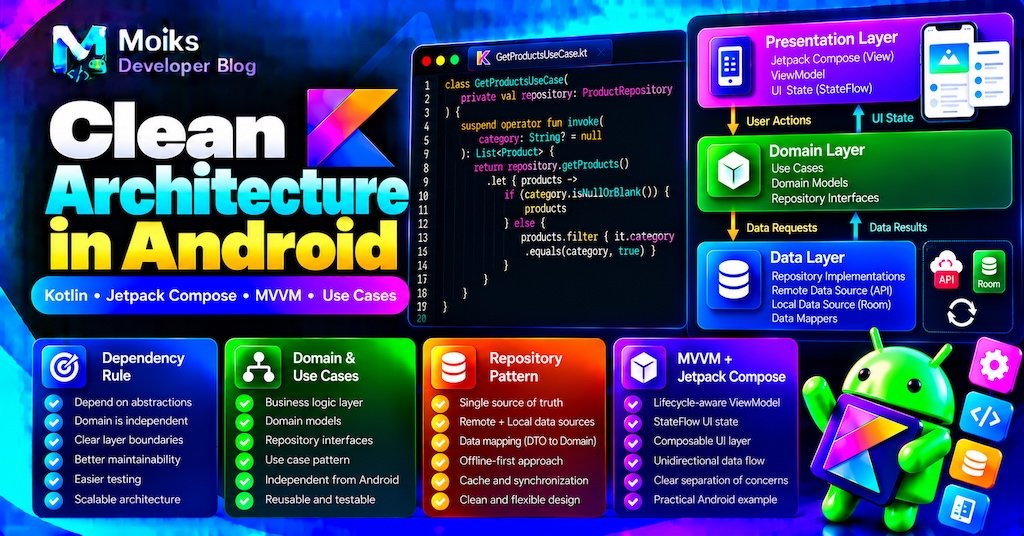
Modern Android applications are becoming increasingly complex.
A typical production application may include:
- Multiple screens
- REST API integration
- Local databases
- User authentication
- Background synchronization
- Offline caching
- Business rules
- Dependency injection
- Unit testing
As the application grows, keeping all these responsibilities organized becomes challenging.
Without a clear architecture, developers may encounter tightly coupled components, duplicated logic, difficult testing, and expensive maintenance.
Clean Architecture provides principles for separating application responsibilities and managing dependencies.
In this tutorial, we’ll learn how to implement Clean Architecture in Android using Kotlin, Jetpack Compose, MVVM, StateFlow, repositories, and use cases.
We’ll also build a practical Product Catalog application to demonstrate how these components work together.
What You’ll Learn
By the end of this tutorial, you’ll understand:
- What Clean Architecture is
- Why Clean Architecture matters
- Clean Architecture vs MVVM
- Data, Domain, and Presentation layers
- The Dependency Rule
- Repository interfaces and implementations
- Use Cases
- Domain models and data models
- Dependency inversion
- StateFlow-based UI state
- Jetpack Compose integration
- Manual dependency injection
- Testing use cases and ViewModels
- Recommended project structure
- Common architecture mistakes
- Production best practices
Let’s begin!
1. What Is Clean Architecture?
Clean Architecture is a software architecture approach that organizes application code around responsibilities and dependency boundaries.
Its central principle is that business rules should not depend on implementation details such as databases, networking libraries, or UI frameworks.
In Android, a practical layered structure commonly includes:
- Presentation Layer
- Domain Layer
- Data Layer
Architecture Overview
+--------------------------------------+
|          Presentation Layer          |
|                                      |
| Jetpack Compose                      |
| ViewModel                            |
| UI State                             |
+--------------------------------------+
                  |
                  v
+--------------------------------------+
|             Domain Layer             |
|                                      |
| Use Cases                            |
| Domain Models                        |
| Repository Interfaces                |
+--------------------------------------+
                  ^
                  |
+--------------------------------------+
|              Data Layer              |
|                                      |
| Repository Implementations           |
| Remote Data Sources                  |
| Local Data Sources                   |
| DTOs and Entity Mappers              |
+--------------------------------------+
Explanation
The Presentation layer handles user interaction and UI state.
The Domain layer contains application business rules and abstractions.
The Data layer implements data access.
Notice that both Presentation and Data can depend on Domain.
The Domain layer should remain independent of those outer implementation details.
2. Why Use Clean Architecture?
Clean Architecture can improve the maintainability of applications with growing complexity.
Key Benefits
Separation of Concerns
Each layer has a clearly defined responsibility.
Testability
Business rules can be tested without Android UI components or real network requests.
Maintainability
Changes to one implementation can often be isolated from unrelated components.
Scalability
Additional features can be organized using consistent boundaries.
Flexibility
Data implementations can be replaced without changing domain business rules.
Example
Imagine your application initially loads products from a REST API.
Later, you decide to support offline storage using Room.
With appropriate abstractions, the UI and domain logic may require little or no modification.
The Data layer can coordinate the new storage implementation.
3. Clean Architecture vs MVVM
Clean Architecture and MVVM solve related but different problems.
MVVM primarily organizes presentation responsibilities.
Clean Architecture defines broader boundaries between business rules and implementation details.
Comparison
| Feature | MVVM | Clean Architecture |
|---|---|---|
| Primary focus | Presentation organization | Application dependency boundaries |
| Main concepts | Model, View, ViewModel | Layers, dependency rule, abstractions |
| UI state management | Common responsibility | Usually handled in Presentation |
| Use Cases | Optional | Common in Domain |
| Repository interfaces | Useful | Common dependency boundary |
| Jetpack Compose support | Yes | Yes |
| Can work together | Yes | Yes |
Recommended Approach
For larger Android applications, MVVM can be used within the Presentation layer of Clean Architecture.
Clean Architecture
       |
       +-- Presentation
       |       |
       |       +-- Jetpack Compose
       |       +-- ViewModel
       |
       +-- Domain
       |       |
       |       +-- Use Cases
       |       +-- Repository Interfaces
       |
       +-- Data
               |
               +-- Repository Implementations
               +-- API / Database
Clean Architecture does not replace MVVM.
They can complement each other.
4. Understanding the Dependency Rule
The Dependency Rule is one of the most important principles of Clean Architecture.
Source-code dependencies should point toward the inner business rules, not outward toward implementation details.
Example
Presentation ------> Domain <------ DataThe Presentation layer depends on domain abstractions.
The Data layer implements domain abstractions.
The Domain layer does not depend on Presentation or Data.
Incorrect Dependency
Domain ---> Retrofit
Domain ---> Room
Domain ---> Jetpack Compose
These dependencies introduce framework-specific implementation details into the business layer.
Better Approach
Domain ---> Repository Interface

Data ---> Repository Interface
Data ---> Retrofit / Room
Important
Clean Architecture is about dependency direction, not simply creating packages named data, domain, and presentation.
5. Understanding the Presentation Layer
The Presentation layer manages the application’s user-facing behavior.
In modern Android development, it commonly contains:
- Jetpack Compose screens
- ViewModels
- UI state classes
- UI events
- Navigation-related presentation logic
Example
sealed interface ProductUiState {

    data object Loading : ProductUiState

    data class Success(
        val products: List<Product>
    ) : ProductUiState

    data class Error(
        val message: String
    ) : ProductUiState
}
The ViewModel exposes this state to Jetpack Compose.
Responsibilities
- Receive user actions
- Execute appropriate use cases
- Transform results into UI state
- Display loading and error states
- Render the interface
Best Practice
Avoid placing direct Retrofit, Room, or file operations inside composables.
6. Understanding the Domain Layer
The Domain layer represents application-specific business concepts and rules.
It may contain:
- Domain models
- Repository interfaces
- Use Cases
- Business validation rules
Example Domain Model
data class Product(
    val id: Int,
    val name: String,
    val price: Double
)
Explanation
Product represents an application concept.
It does not depend on Android Context, Compose, Retrofit, or Room.
Best Practice
Keep the Domain layer independent of Android-specific frameworks whenever practical.
Important
Not every Android application needs a separate Domain layer.
For small applications with simple data operations, a Presentation and Data architecture may be sufficient.
Introduce additional layers when they provide meaningful value.
7. Understanding the Data Layer
The Data layer is responsible for obtaining and managing application data.
It may include:
- Repository implementations
- Retrofit services
- Room DAOs
- DataStore
- Remote data sources
- Local data sources
- Data Transfer Objects
- Database entities
- Data mappers
Example
class ProductRepositoryImpl(
    private val remoteDataSource: ProductRemoteDataSource
) : ProductRepository {

    override suspend fun getProducts(): List<Product> {

        return remoteDataSource
            .getProducts()
            .map { dto ->
                dto.toDomain()
            }
    }
}
Explanation
The repository obtains data from a remote source.
It converts data-layer models into domain models.
The rest of the application does not need to know which networking library is used.
8. Repository Interfaces in Clean Architecture
Repository interfaces define the operations required by business logic.
A common Clean Architecture approach places repository interfaces in the Domain layer and implementations in the Data layer.
Domain Layer
interface ProductRepository {

    suspend fun getProducts(): List<Product>
}
Data Layer
class ProductRepositoryImpl(
    private val dataSource: ProductDataSource
) : ProductRepository {

    override suspend fun getProducts(): List<Product> {

        return dataSource.getProducts()
    }
}
Benefits
- Dependency inversion
- Easier unit testing
- Flexible implementations
- Reduced coupling
Important
Repository interfaces should expose operations meaningful to their consumers rather than unnecessarily mirroring every database or networking function.
9. What Is a Use Case?
A Use Case represents an application operation or business action.
Examples include:
- GetProductsUseCase
- LoginUserUseCase
- SaveExpenseUseCase
- CalculateBudgetUseCase
- ValidateEmailUseCase
- SyncUserDataUseCase
Example
class GetProductsUseCase(
    private val repository: ProductRepository
) {

    suspend operator fun invoke(): List<Product> {

        return repository.getProducts()
    }
}
Explanation
The Use Case calls the repository and returns products.
Why Use Use Cases?
Use Cases become especially useful when operations involve:
- Multiple repositories
- Business validation
- Data transformation
- Reusable business rules
- Complex workflows
Important
A Use Case that only delegates to a repository is acceptable for teaching architecture, but it may be unnecessary in a small production application.
Avoid creating abstraction layers without a clear purpose.
10. Domain Models vs Data Models
A data model often represents information received from a specific source.
A domain model represents the application’s business concept.
Remote DTO
data class ProductDto(
    val product_id: Int,
    val product_name: String,
    val product_price: Double
)
Domain Model
data class Product(
    val id: Int,
    val name: String,
    val price: Double
)
Mapper
fun ProductDto.toDomain(): Product {

    return Product(
        id = product_id,
        name = product_name,
        price = product_price
    )
}
Explanation
The mapper converts a remote data representation into a domain representation.
This prevents API field names and data formats from spreading throughout the application.
Best Practice
Introduce separate models when they protect useful boundaries or represent genuinely different concerns.
11. Understanding Dependency Inversion
Dependency Inversion means higher-level business logic depends on abstractions rather than concrete implementation details.
Without Dependency Inversion
class GetProductsUseCase {

    private val repository =
        ProductRepositoryImpl()
}
Problem
The Use Case directly creates a specific repository implementation.
This makes replacement and testing harder.
With Dependency Inversion
class GetProductsUseCase(
    private val repository: ProductRepository
)
Benefits
- Flexible implementations
- Better testing
- Reduced coupling
- Easier maintenance
Dependency inversion is one of the key mechanisms that makes Clean Architecture practical.
Practical Mini-Project: Product Catalog Using Clean Architecture
Now let’s implement a Product Catalog application.
Application Features
- Product list
- Loading state
- Error state
- Retry functionality
- Product filtering
- Use Case
- Repository abstraction
- ViewModel
- StateFlow
- Jetpack Compose UI
Technology Stack
- Kotlin
- Jetpack Compose
- Material 3
- ViewModel
- Kotlin Coroutines
- StateFlow
- Clean Architecture
- MVVM
We’ll use an in-memory data source to keep the project focused on architecture.
12. Recommended Project Structure
com.example.cleanarchitecture/
│
├── data/
│   ├── datasource/
│   │   └── ProductLocalDataSource.kt
│   │
│   └── repository/
│       └── ProductRepositoryImpl.kt
│
├── domain/
│   ├── model/
│   │   └── Product.kt
│   │
│   ├── repository/
│   │   └── ProductRepository.kt
│   │
│   └── usecase/
│       └── GetProductsUseCase.kt
│
├── presentation/
│   └── product/
│       ├── ProductUiState.kt
│       ├── ProductViewModel.kt
│       ├── ProductViewModelFactory.kt
│       └── ProductScreen.kt
│
└── MainActivity.kt
This structure separates responsibilities clearly.
For larger projects, consider organizing code by feature and introducing Gradle modules where appropriate.
13. Step 1 — Create the Domain Model
File: domain/model/Product.kt
package com.example.cleanarchitecture.domain.model

data class Product(
    val id: Int,
    val name: String,
    val price: Double,
    val category: String
)
Explanation
This model represents a product independently of the UI and data source.
14. Step 2 — Create the Repository Interface
File: domain/repository/ProductRepository.kt
package com.example.cleanarchitecture.domain.repository

import com.example.cleanarchitecture.domain.model.Product

interface ProductRepository {

    suspend fun getProducts(): List<Product>
}
Explanation
The Domain layer defines what data operations it needs.
It does not specify how the products are retrieved.
15. Step 3 — Create the Use Case
File: domain/usecase/GetProductsUseCase.kt
package com.example.cleanarchitecture.domain.usecase

import com.example.cleanarchitecture.domain.model.Product
import com.example.cleanarchitecture.domain.repository.ProductRepository

class GetProductsUseCase(
    private val repository: ProductRepository
) {

    suspend operator fun invoke(
        category: String? = null
    ): List<Product> {

        val products = repository.getProducts()

        return if (category.isNullOrBlank()) {

            products

        } else {

            products.filter { product ->

                product.category.equals(
                    category,
                    ignoreCase = true
                )
            }
        }
    }
}
Explanation
The Use Case loads products through the repository.
It also applies an optional category filter.
This is an example of placing reusable application logic in the Domain layer.
16. Step 4 — Create the Local Data Source
File: data/datasource/ProductLocalDataSource.kt
package com.example.cleanarchitecture.data.datasource

import com.example.cleanarchitecture.domain.model.Product
import kotlinx.coroutines.delay

class ProductLocalDataSource {

    suspend fun getProducts(): List<Product> {

        delay(800)

        return listOf(

            Product(
                id = 1,
                name = "Android Phone",
                price = 19999.0,
                category = "Electronics"
            ),

            Product(
                id = 2,
                name = "Bluetooth Speaker",
                price = 2499.0,
                category = "Audio"
            ),

            Product(
                id = 3,
                name = "Smart Watch",
                price = 4999.0,
                category = "Electronics"
            ),

            Product(
                id = 4,
                name = "Wireless Headphones",
                price = 2999.0,
                category = "Audio"
            )
        )
    }
}
Explanation
The data source returns sample products.
The delay simulates asynchronous loading.
In a real application, this data source could use Room or another local storage mechanism.
For simplicity, this example returns domain models directly.
In larger applications, data-specific models and mappers may be appropriate.
17. Step 5 — Create the Repository Implementation
File: data/repository/ProductRepositoryImpl.kt
package com.example.cleanarchitecture.data.repository

import com.example.cleanarchitecture.data.datasource.ProductLocalDataSource
import com.example.cleanarchitecture.domain.model.Product
import com.example.cleanarchitecture.domain.repository.ProductRepository

class ProductRepositoryImpl(
    private val dataSource: ProductLocalDataSource
) : ProductRepository {

    override suspend fun getProducts(): List<Product> {

        return dataSource.getProducts()
    }
}
Explanation
ProductRepositoryImpl implements the domain repository interface.
The repository obtains products from the data source.
The Domain layer remains independent of this implementation.
18. Step 6 — Create the UI State
File: presentation/product/ProductUiState.kt
package com.example.cleanarchitecture.presentation.product

import com.example.cleanarchitecture.domain.model.Product

sealed interface ProductUiState {

    data object Loading : ProductUiState

    data class Success(
        val products: List<Product>
    ) : ProductUiState

    data class Error(
        val message: String
    ) : ProductUiState
}
Explanation
The UI state describes the possible screen conditions.
The Presentation layer decides how these states should be displayed.
19. Step 7 — Create the ViewModel
File: presentation/product/ProductViewModel.kt
package com.example.cleanarchitecture.presentation.product

import androidx.lifecycle.ViewModel
import androidx.lifecycle.viewModelScope

import com.example.cleanarchitecture.domain.usecase.GetProductsUseCase

import kotlinx.coroutines.CancellationException
import kotlinx.coroutines.Job
import kotlinx.coroutines.flow.MutableStateFlow
import kotlinx.coroutines.flow.StateFlow
import kotlinx.coroutines.flow.asStateFlow
import kotlinx.coroutines.launch

class ProductViewModel(
    private val getProductsUseCase: GetProductsUseCase
) : ViewModel() {

    private val _uiState =
        MutableStateFlow<ProductUiState>(
            ProductUiState.Loading
        )

    val uiState: StateFlow<ProductUiState> =
        _uiState.asStateFlow()

    private var loadJob: Job? = null

    init {
        loadProducts()
    }

    fun loadProducts(
        category: String? = null
    ) {

        loadJob?.cancel()

        loadJob = viewModelScope.launch {

            _uiState.value = ProductUiState.Loading

            try {

                val products =
                    getProductsUseCase(category)

                _uiState.value =
                    ProductUiState.Success(products)

            } catch (exception: CancellationException) {

                throw exception

            } catch (exception: Exception) {

                _uiState.value =
                    ProductUiState.Error(
                        "Unable to load products"
                    )
            }
        }
    }
}
Explanation
The ViewModel depends on the Use Case rather than the repository implementation.
It manages the UI state and coordinates product loading.
It does not know whether the data comes from an API, database, or in-memory source.
20. Step 8 — Create the ViewModel Factory
File: presentation/product/ProductViewModelFactory.kt
package com.example.cleanarchitecture.presentation.product

import androidx.lifecycle.ViewModel
import androidx.lifecycle.ViewModelProvider

import com.example.cleanarchitecture.domain.usecase.GetProductsUseCase

class ProductViewModelFactory(
    private val getProductsUseCase: GetProductsUseCase
) : ViewModelProvider.Factory {

    override fun <T : ViewModel> create(
        modelClass: Class<T>
    ): T {

        if (
            modelClass.isAssignableFrom(
                ProductViewModel::class.java
            )
        ) {

            @Suppress("UNCHECKED_CAST")
            return ProductViewModel(
                getProductsUseCase
            ) as T
        }

        throw IllegalArgumentException(
            "Unknown ViewModel class"
        )
    }
}
Explanation
The factory provides the Use Case dependency.
This is manual dependency injection.
In larger applications, Hilt can simplify dependency provisioning.
21. Step 9 — Create the Jetpack Compose Screen
File: presentation/product/ProductScreen.kt
package com.example.cleanarchitecture.presentation.product

import androidx.compose.foundation.layout.*
import androidx.compose.foundation.lazy.LazyColumn
import androidx.compose.foundation.lazy.items
import androidx.compose.material3.*
import androidx.compose.runtime.*
import androidx.compose.ui.Alignment
import androidx.compose.ui.Modifier
import androidx.compose.ui.unit.dp

import androidx.lifecycle.compose.collectAsStateWithLifecycle

import com.example.cleanarchitecture.domain.model.Product

@OptIn(ExperimentalMaterial3Api::class)
@Composable
fun ProductScreen(
    viewModel: ProductViewModel
) {

    val uiState by viewModel.uiState
        .collectAsStateWithLifecycle()

    Scaffold(
        topBar = {

            TopAppBar(
                title = {
                    Text("Clean Architecture")
                }
            )
        }
    ) { paddingValues ->

        Column(
            modifier = Modifier
                .fillMaxSize()
                .padding(paddingValues)
        ) {

            Row(
                modifier = Modifier
                    .fillMaxWidth()
                    .padding(16.dp),
                horizontalArrangement =
                    Arrangement.spacedBy(8.dp)
            ) {

                Button(
                    onClick = {
                        viewModel.loadProducts()
                    }
                ) {

                    Text("All")
                }

                Button(
                    onClick = {
                        viewModel.loadProducts("Electronics")
                    }
                ) {

                    Text("Electronics")
                }

                Button(
                    onClick = {
                        viewModel.loadProducts("Audio")
                    }
                ) {

                    Text("Audio")
                }
            }

            Box(
                modifier = Modifier
                    .fillMaxSize()
            ) {

                when (val state = uiState) {

                    ProductUiState.Loading -> {

                        CircularProgressIndicator(
                            modifier = Modifier.align(
                                Alignment.Center
                            )
                        )
                    }

                    is ProductUiState.Success -> {

                        LazyColumn(
                            contentPadding = PaddingValues(16.dp),
                            verticalArrangement =
                                Arrangement.spacedBy(12.dp)
                        ) {

                            items(
                                items = state.products,
                                key = { it.id }
                            ) { product ->

                                ProductCard(product)
                            }
                        }
                    }

                    is ProductUiState.Error -> {

                        Column(
                            modifier = Modifier.align(
                                Alignment.Center
                            ),
                            horizontalAlignment =
                                Alignment.CenterHorizontally,
                            verticalArrangement =
                                Arrangement.spacedBy(12.dp)
                        ) {

                            Text(state.message)

                            Button(
                                onClick = {
                                    viewModel.loadProducts()
                                }
                            ) {

                                Text("Retry")
                            }
                        }
                    }
                }
            }
        }
    }
}

@Composable
fun ProductCard(
    product: Product
) {

    Card(
        modifier = Modifier.fillMaxWidth()
    ) {

        Column(
            modifier = Modifier.padding(16.dp),
            verticalArrangement =
                Arrangement.spacedBy(8.dp)
        ) {

            Text(
                text = product.name,
                style = MaterialTheme.typography.titleMedium
            )

            Text(
                text = product.category,
                style = MaterialTheme.typography.bodyMedium
            )

            Text(
                text = "₹${product.price}",
                color = MaterialTheme.colorScheme.primary
            )
        }
    }
}
Explanation
The Compose screen observes StateFlow.
It displays loading, success, and error states.
The category buttons send user actions to the ViewModel.
The ViewModel executes the Use Case.
The UI does not directly access the repository or data source.
22. Step 10 — Create MainActivity
File: MainActivity.kt
package com.example.cleanarchitecture

import android.os.Bundle

import androidx.activity.ComponentActivity
import androidx.activity.compose.setContent
import androidx.compose.material3.MaterialTheme
import androidx.compose.runtime.remember
import androidx.lifecycle.viewmodel.compose.viewModel

import com.example.cleanarchitecture.data.datasource.ProductLocalDataSource
import com.example.cleanarchitecture.data.repository.ProductRepositoryImpl
import com.example.cleanarchitecture.domain.usecase.GetProductsUseCase
import com.example.cleanarchitecture.presentation.product.ProductScreen
import com.example.cleanarchitecture.presentation.product.ProductViewModel
import com.example.cleanarchitecture.presentation.product.ProductViewModelFactory

class MainActivity : ComponentActivity() {

    override fun onCreate(
        savedInstanceState: Bundle?
    ) {

        super.onCreate(savedInstanceState)

        setContent {

            MaterialTheme {

                val factory = remember {

                    val dataSource =
                        ProductLocalDataSource()

                    val repository =
                        ProductRepositoryImpl(dataSource)

                    val useCase =
                        GetProductsUseCase(repository)

                    ProductViewModelFactory(useCase)
                }

                val productViewModel: ProductViewModel =
                    viewModel(factory = factory)

                ProductScreen(
                    viewModel = productViewModel
                )
            }
        }
    }
}
Explanation
MainActivity acts as a simple composition root.
It creates the data source, repository, use case, and ViewModel factory.
The dependencies are assembled from the outer layer inward.
For larger applications, use Hilt or another dependency injection solution to manage object creation.
23. Required Dependencies
Add the following dependencies to your Android app module.
dependencies {

    implementation(
        "androidx.activity:activity-compose:<version>"
    )

    implementation(
        "androidx.lifecycle:lifecycle-viewmodel-ktx:<version>"
    )

    implementation(
        "androidx.lifecycle:lifecycle-viewmodel-compose:<version>"
    )

    implementation(
        "androidx.lifecycle:lifecycle-runtime-compose:<version>"
    )

    implementation(
        "org.jetbrains.kotlinx:kotlinx-coroutines-android:<version>"
    )

    implementation(
        "androidx.compose.material3:material3"
    )
}
Replace version placeholders with compatible stable versions.
If your project uses the Compose BOM, use it to manage compatible Compose library versions.
24. Expected Application UI
Loading State
+--------------------------------+
|       Clean Architecture       |
|                                |
| [ All ] [ Electronics ] [Audio]|
|                                |
|              ○                 |
|                                |
|       Loading products...      |
+--------------------------------+
Success State
+--------------------------------+
|       Clean Architecture       |
|                                |
| [ All ] [ Electronics ] [Audio]|
|                                |
| +----------------------------+ |
| | Android Phone              | |
| | Electronics                | |
| | ₹19999.0                   | |
| +----------------------------+ |
|                                |
| +----------------------------+ |
| | Bluetooth Speaker          | |
| | Audio                      | |
| | ₹2499.0                    | |
| +----------------------------+ |
|                                |
| +----------------------------+ |
| | Smart Watch                | |
| | Electronics                | |
| | ₹4999.0                    | |
| +----------------------------+ |
+--------------------------------+
Filtered State
When the user selects Audio:
+--------------------------------+
|       Clean Architecture       |
|                                |
| [ All ] [ Electronics ] [Audio]|
|                                |
| +----------------------------+ |
| | Bluetooth Speaker          | |
| | Audio                      | |
| | ₹2499.0                    | |
| +----------------------------+ |
|                                |
| +----------------------------+ |
| | Wireless Headphones        | |
| | Audio                      | |
| | ₹2999.0                    | |
| +----------------------------+ |
+--------------------------------+
25. How the Complete Application Works
Step 1: User Opens the Application
MainActivity starts and displays ProductScreen.
Step 2: ViewModel Initializes
ProductViewModel calls loadProducts().
Step 3: Use Case Executes
GetProductsUseCase requests products from ProductRepository.
Step 4: Repository Loads Data
ProductRepositoryImpl obtains products from ProductLocalDataSource.
Step 5: Data Returns to the Domain Layer
The repository returns the product list.
Step 6: Use Case Applies Business Rules
If a category was provided, the Use Case filters products.
Step 7: ViewModel Updates StateFlow
The ViewModel publishes ProductUiState.Success.
Step 8: Compose Updates the UI
ProductScreen displays the products.
Step 9: User Selects a Category
The UI forwards the category selection to the ViewModel.
The same flow executes again with the selected filter.
26. Testing the Domain Layer
One major benefit of Clean Architecture is the ability to test business logic independently.
Let’s test GetProductsUseCase.
Fake Repository
class FakeProductRepository : ProductRepository {

    override suspend fun getProducts(): List<Product> {

        return listOf(

            Product(
                id = 1,
                name = "Phone",
                price = 10000.0,
                category = "Electronics"
            ),

            Product(
                id = 2,
                name = "Speaker",
                price = 2000.0,
                category = "Audio"
            )
        )
    }
}
Use Case Test
class GetProductsUseCaseTest {

    @Test
    fun `filters products by category`() = runTest {

        val repository =
            FakeProductRepository()

        val useCase =
            GetProductsUseCase(repository)

        val result =
            useCase("Audio")

        assertEquals(
            1,
            result.size
        )

        assertEquals(
            "Speaker",
            result.first().name
        )
    }
}
Explanation
The test verifies category filtering.
No Android UI, database, or network connection is required.
The Domain layer can be tested as ordinary Kotlin code.
27. Testing the Presentation Layer
The ViewModel can also be tested using fake dependencies.
Example
@OptIn(ExperimentalCoroutinesApi::class)
class ProductViewModelTest {

    @get:Rule
    val mainDispatcherRule = MainDispatcherRule()

    @Test
    fun `loads products successfully`() = runTest {

        val repository =
            FakeProductRepository()

        val useCase =
            GetProductsUseCase(repository)

        val viewModel =
            ProductViewModel(useCase)

        advanceUntilIdle()

        val state =
            viewModel.uiState.value

        assertTrue(
            state is ProductUiState.Success
        )
    }
}
This example reuses the MainDispatcherRule introduced in our Kotlin Flow testing tutorial.
Explanation
The test verifies the ViewModel’s state.
The ViewModel uses a real Use Case with a fake repository.
This demonstrates how Clean Architecture supports isolated testing.
28. Clean Architecture with Hilt
Manual dependency injection works well for small applications.
However, larger applications may contain dozens of repositories, use cases, and ViewModels.
Hilt helps manage dependency creation.
Example Repository Binding
@Module
@InstallIn(SingletonComponent::class)
abstract class RepositoryModule {

    @Binds
    abstract fun bindProductRepository(
        implementation: ProductRepositoryImpl
    ): ProductRepository
}
Example ViewModel
@HiltViewModel
class ProductViewModel @Inject constructor(
    private val getProductsUseCase: GetProductsUseCase
) : ViewModel()
Important
This is a conceptual Hilt example.
For it to work, ProductRepositoryImpl and its dependencies must also be injectable, and the application must have the required Hilt configuration.
We’ll cover complete Hilt integration in a dedicated tutorial.
29. Clean Architecture with Retrofit and Room
In a production application, the Data layer may coordinate remote and local sources.
Example
Presentation Layer
       |
       v
ProductViewModel
       |
       v
GetProductsUseCase
       |
       v
ProductRepository
       ^
       |
ProductRepositoryImpl
       |
       +---- Retrofit API
       |
       +---- Room Database
Typical Offline-First Flow
- UI observes products from the repository.
- Repository exposes locally stored products.
- Repository synchronizes data from the network.
- Remote results are saved to Room.
- Room emits updated data.
- ViewModel updates UI state.
- Compose renders the latest products.
Benefits
- Offline support
- Centralized data access
- Reactive updates
- Reduced unnecessary network requests
- Better user experience
Best Practice
Define a clear source-of-truth strategy.
For many offline-first applications, the local database is the source of truth observed by the UI.
30. Clean Architecture and Multi-Module Android Projects
As an application grows, Clean Architecture boundaries can be enforced through Gradle modules.
Example
app/
│
├── core/
│   ├── model/
│   ├── common/
│   ├── network/
│   └── database/
│
├── feature/
│   ├── products/
│   ├── profile/
│   └── settings/
│
└── domain/
    └── products/
Explanation
Each module has a focused responsibility.
Module dependencies can enforce architectural boundaries.
Important
Do not introduce multi-module architecture only because a project uses Clean Architecture.
For smaller applications, packages inside one module are often sufficient.
31. Common Clean Architecture Mistakes
Mistake 1: Creating Too Many Layers
Not every application needs separate modules and dozens of interfaces.
Mistake 2: Mixing Framework Dependencies into Domain
Avoid unnecessary Android, Retrofit, Room, or Compose dependencies in domain business logic.
Mistake 3: Putting Business Logic Inside ViewModel
Move reusable or complex business rules into appropriate domain components.
Mistake 4: Creating Use Cases for Every Function
Introduce Use Cases when they improve clarity, reuse, or testability.
Mistake 5: Exposing DTOs Directly to UI
Map source-specific models when necessary to protect application boundaries.
Mistake 6: Ignoring Dependency Direction
Dependencies should respect architectural boundaries.
Mistake 7: Creating Repositories Inside ViewModels
Prefer constructor injection.
Mistake 8: Making Repository Interfaces Too Generic
Design interfaces around meaningful application operations.
Mistake 9: Skipping Unit Tests
Test business rules and presentation behavior independently.
Mistake 10: Overengineering Small Applications
Architecture should solve actual problems, not create unnecessary complexity.
32. Clean Architecture Best Practices
Follow these recommendations:
- Keep responsibilities clearly separated.
- Respect the Dependency Rule.
- Keep business rules independent of framework details.
- Use repository abstractions where they provide value.
- Prefer constructor injection.
- Use Use Cases for meaningful business operations.
- Keep ViewModels focused on presentation logic.
- Expose immutable UI state.
- Use StateFlow for observable screen state.
- Use lifecycle-aware collection in Compose.
- Handle coroutine cancellation correctly.
- Keep data-source implementations in the Data layer.
- Introduce DTO and domain model mapping when appropriate.
- Test domain business rules independently.
- Use fake repositories for unit testing.
- Avoid unnecessary abstraction layers.
- Scale architecture gradually as the project grows.
33. Clean Architecture Quick Reference
| Component | Responsibility |
|---|---|
| Presentation Layer | UI and presentation state |
| Domain Layer | Business rules and abstractions |
| Data Layer | Data access implementations |
| Domain Model | Application business concept |
| DTO | External data representation |
| Repository Interface | Data access contract |
| Repository Implementation | Concrete data access behavior |
| Use Case | Application operation or business rule |
| ViewModel | Presentation state management |
| StateFlow | Observable state |
| Dependency Injection | External dependency provisioning |
| Hilt | Android dependency injection framework |
| Retrofit | HTTP networking |
| Room | Local database |
34. Practical Exercises
Exercise 1: Domain Model
Create a User domain model.
Exercise 2: Repository Interface
Create UserRepository with a getUsers() function.
Exercise 3: Use Case
Create GetUsersUseCase.
Exercise 4: Data Source
Implement an in-memory user data source.
Exercise 5: Repository Implementation
Connect the repository implementation to the data source.
Exercise 6: ViewModel
Create UserViewModel with StateFlow.
Exercise 7: Compose UI
Display the users using LazyColumn.
Exercise 8: Filtering
Add a Use Case that filters users by name.
Exercise 9: Unit Testing
Test the filtering logic with a fake repository.
Exercise 10: Complete Project
Build the Product Catalog application from this tutorial and extend it with a Room database.
35. Frequently Asked Questions
What is Clean Architecture in Android?
Clean Architecture is an approach to organizing software around responsibilities and dependency boundaries.
It helps keep business rules independent of UI and data implementation details.
What are the main layers of Clean Architecture?
A common Android implementation uses Presentation, Domain, and Data layers.
Is Clean Architecture the same as MVVM?
No.
MVVM focuses on presentation organization.
Clean Architecture defines broader application dependency boundaries.
They can be used together.
Is Clean Architecture suitable for Jetpack Compose?
Yes.
Jetpack Compose can serve as the UI technology in the Presentation layer.
What is the Domain layer?
The Domain layer contains application business rules, domain models, and relevant abstractions.
What is a Use Case?
A Use Case represents an application operation or business action.
Where should repository interfaces be placed?
In a common Clean Architecture approach, repository interfaces are placed in the Domain layer, while implementations are placed in the Data layer.
Is Hilt required for Clean Architecture?
No.
Manual dependency injection and other dependency injection approaches can also be used.
Should every Android application use Clean Architecture?
Not necessarily.
The level of architectural complexity should match the application’s requirements.
Can Clean Architecture improve testing?
Yes.
Separating business logic from framework implementations makes isolated unit testing easier.
What We’ve Learned
In this tutorial, we explored:
- Clean Architecture fundamentals
- Clean Architecture vs MVVM
- The Dependency Rule
- Presentation Layer
- Domain Layer
- Data Layer
- Repository Pattern
- Use Cases
- Domain models and DTOs
- Dependency inversion
- Manual dependency injection
- StateFlow and ViewModel
- Jetpack Compose integration
- Practical Product Catalog application
- Unit testing
- Hilt integration concepts
- Retrofit and Room integration
- Multi-module architecture
- Common mistakes and best practices
Clean Architecture provides a structured approach to building maintainable Android applications.
By combining Kotlin, Jetpack Compose, MVVM, StateFlow, repositories, and Use Cases, developers can build applications with clearer responsibilities and better testability.
The key is to apply architectural principles pragmatically and avoid unnecessary complexity.
What’s Next?
In our next tutorial, we’ll explore:
Article 40 — Repository Pattern in Android with Kotlin & Jetpack Compose: Single Source of Truth, Caching & Offline-First
You’ll learn:
- Repository Pattern fundamentals
- Repository interfaces and implementations
- Local and remote data sources
- Single Source of Truth
- Offline-first architecture
- Room and Retrofit integration
- Cache synchronization
- Error handling
- StateFlow integration
- MVVM and Clean Architecture
- Practical offline-first Android mini-project
- Production best practices
Happy Coding!
Continue learning modern Android development with Moiks Developer Blog.


