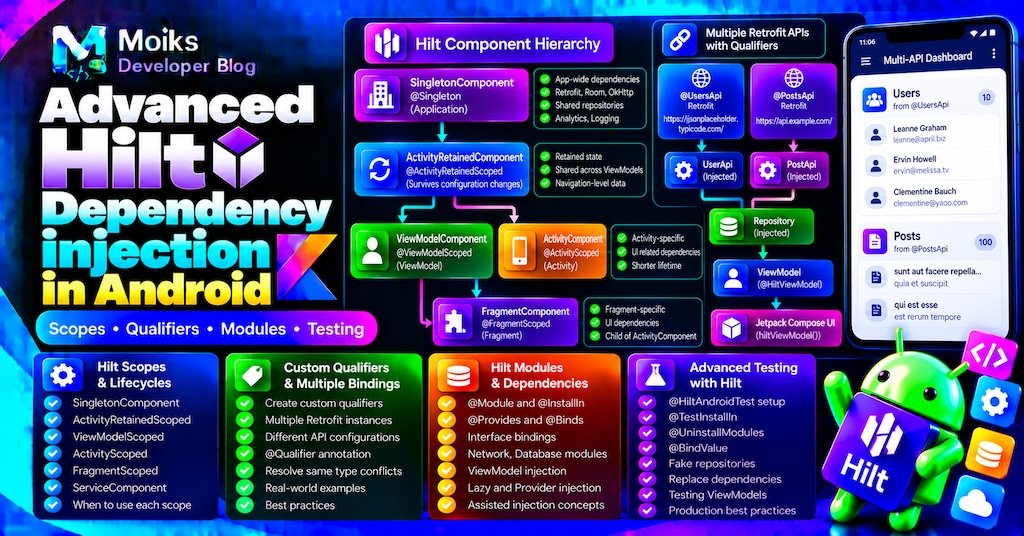
Dependency Injection is a foundational part of modern Android architecture.
In previous tutorials, we learned how Hilt simplifies dependency creation and integration with ViewModel, Retrofit, Room, and Jetpack Compose.
However, production Android applications often have more complex requirements.
For example:
- Multiple APIs with different base URLs
- Different implementations of the same interface
- Application-wide shared dependencies
- Activity-specific resources
- ViewModel-specific sessions
- Expensive objects that should be created lazily
- Feature modules with independent dependencies
- Fake repositories for automated testing
Understanding advanced Hilt concepts helps developers manage these scenarios safely and efficiently.
In this tutorial, we’ll explore advanced Hilt techniques and build a practical Multi-API Dashboard application.
What You’ll Learn
By the end of this tutorial, you’ll understand:
- Hilt component hierarchy
- Dependency scopes and lifecycles
- SingletonComponent
- ActivityRetainedComponent
- ViewModelComponent
- ActivityComponent
- Custom qualifiers
- Multiple Retrofit instances
- @Binds vs @Provides
- @ViewModelScoped dependencies
- Lazy injection
- Provider injection
- Assisted injection concepts
- Hilt modularization
- @TestInstallIn
- @UninstallModules
- @BindValue
- Dependency graph debugging
- Production best practices
1. Understanding the Hilt Component Hierarchy
Hilt provides predefined components corresponding to Android lifecycles.
Each component manages a set of dependencies and their lifetimes.
Simplified Component Hierarchy
SingletonComponent
        |
        +-- ActivityRetainedComponent
        |          |
        |          +-- ViewModelComponent
        |
        +-- ActivityComponent
        |          |
        |          +-- FragmentComponent
        |          |
        |          +-- ViewComponent
        |
        +-- ServiceComponent
This diagram is simplified. Hilt also supports additional components, including ViewWithFragmentComponent.
Why Components Matter
A component determines:
- Which bindings are available.
- How long scoped dependencies live.
- Which parent-component dependencies can be accessed.
- Which Android lifecycle owns the dependency graph.
Choosing the correct component is essential for avoiding memory leaks and unnecessary object creation.
2. Understanding Hilt Scopes
A scope determines whether a dependency instance is reused within a Hilt component.
Common Hilt Scopes
| Scope | Component | Typical Lifetime |
|---|---|---|
| @Singleton | SingletonComponent | Application process |
| @ActivityRetainedScoped | ActivityRetainedComponent | Activity across configuration changes |
| @ViewModelScoped | ViewModelComponent | One ViewModel instance |
| @ActivityScoped | ActivityComponent | One Activity instance |
| @FragmentScoped | FragmentComponent | One Fragment instance |
| @ServiceScoped | ServiceComponent | One Service instance |
Important
A scoped dependency is not necessarily created when its component is created.
Hilt generally constructs it when first requested.
3. SingletonComponent and @Singleton
SingletonComponent is the application-level Hilt component.
Dependencies scoped with @Singleton are shared within this component.
Example
@Singleton
class AnalyticsManager @Inject constructor() {

    fun trackEvent(event: String) {
        println("Event: $event")
    }
}
Common Singleton Dependencies
- Room database
- Retrofit instance
- OkHttpClient
- Shared repositories
- Application-wide configuration
- Analytics services
Important
@Singleton means one instance per Hilt SingletonComponent.
It does not guarantee one instance across multiple Android processes.
4. ActivityRetainedComponent
ActivityRetainedComponent survives configuration changes such as screen rotation.
Example
@ActivityRetainedScoped
class UserSession @Inject constructor() {

    val sessionId = System.currentTimeMillis()
}
Explanation
The same ActivityRetainedScoped instance can be reused across Activity recreation caused by configuration changes.
The instance is destroyed when the retained Activity lifecycle ends.
Common Use Cases
- Activity-wide shared state
- Retained coordinators
- Resources shared across multiple ViewModels belonging to the same retained Activity
Important
Do not store references to Activity views or Activity Context inside ActivityRetainedScoped objects.
5. ViewModelComponent and @ViewModelScoped
ViewModelComponent manages dependencies associated with a particular Hilt ViewModel.
Example
@ViewModelScoped
class SearchSession @Inject constructor() {

    val filters = mutableListOf<String>()
}
Inject into ViewModel
@HiltViewModel
class SearchViewModel @Inject constructor(
    private val searchSession: SearchSession
) : ViewModel()
Explanation
SearchSession is scoped to the ViewModel component.
Multiple dependencies within the same ViewModel component can receive the same SearchSession instance.
Different ViewModel instances receive separate ViewModelScoped instances.
When to Use It
Use @ViewModelScoped for stateful collaborators that belong to a particular ViewModel.
6. ActivityScoped Dependencies
ActivityScoped dependencies are associated with an Activity instance.
Example
@ActivityScoped
class ActivityTracker @Inject constructor() {

    var screenCount = 0
}
Important
ActivityScoped dependencies do not survive Activity recreation.
Use ActivityRetainedScoped when sharing across configuration changes is required.
7. Scoped vs Unscoped Dependencies
Not every dependency requires a scope.
Unscoped Example
class DateFormatter @Inject constructor()Hilt may create a new DateFormatter instance for each injection request.
Scoped Example
@Singleton
class DateFormatter @Inject constructor()
Hilt reuses the scoped instance within SingletonComponent.
Recommendation
Prefer unscoped dependencies unless sharing an instance provides a meaningful benefit.
Scopes are useful for:
- Expensive object creation
- Shared state
- Resource ownership
- Consistent instance identity
Avoid applying @Singleton automatically to every class.
8. Understanding Custom Qualifiers
Sometimes an application requires multiple dependencies of the same type.
For example:
- Public Retrofit API
- Authentication Retrofit API
- Analytics Retrofit API
All three may use Retrofit.
Without qualifiers, Hilt cannot distinguish which instance should be injected.
Create Qualifiers
@Qualifier
@Retention(AnnotationRetention.BINARY)
annotation class PublicApi
@Qualifier
@Retention(AnnotationRetention.BINARY)
annotation class AuthApiExplanation
Qualifiers identify different bindings that share the same Kotlin type.
9. Multiple Retrofit Instances with Hilt
Consider an application using two backend services.
Public API
https://jsonplaceholder.typicode.com/Authentication API
https://api.example.com/The second URL is a placeholder representing a separate backend.
NetworkModule
@Module
@InstallIn(SingletonComponent::class)
object NetworkModule {

    @Provides
    @Singleton
    fun provideOkHttpClient(): OkHttpClient {
        return OkHttpClient.Builder().build()
    }

    @Provides
    @Singleton
    @PublicApi
    fun providePublicRetrofit(
        client: OkHttpClient
    ): Retrofit {

        return Retrofit.Builder()
            .baseUrl(
                "https://jsonplaceholder.typicode.com/"
            )
            .client(client)
            .addConverterFactory(
                GsonConverterFactory.create()
            )
            .build()
    }

    @Provides
    @Singleton
    @AuthApi
    fun provideAuthRetrofit(
        client: OkHttpClient
    ): Retrofit {

        return Retrofit.Builder()
            .baseUrl("https://api.example.com/")
            .client(client)
            .addConverterFactory(
                GsonConverterFactory.create()
            )
            .build()
    }
}
Explanation
Hilt now has two Retrofit bindings.
The qualifiers distinguish them.
Important
Both Retrofit instances share the same OkHttpClient in this example.
If authentication requires different interceptors, TLS configuration, or timeouts, provide separately qualified OkHttpClient instances as well.
10. Injecting Qualified Dependencies
Example
class PublicRepository @Inject constructor(
    @PublicApi private val retrofit: Retrofit
)
class AuthRepository @Inject constructor(
@AuthApi private val retrofit: Retrofit
)Explanation
The qualifier tells Hilt which Retrofit instance to supply.
Best Practice
When multiple instances of the same type exist, consistently qualify the relevant bindings and injection points.
Practical Mini-Project: Multi-API Dashboard
We’ll build a dashboard demonstrating advanced Hilt concepts.
Features
- Fetch users from a public API
- Fetch posts from a public API
- Display data using Jetpack Compose
- Use two qualified Retrofit instances
- Inject API services
- Use repository abstractions
- Manage UI state with StateFlow
- Use a Hilt ViewModel
- Handle loading and errors
Technology Stack
- Kotlin
- Jetpack Compose
- Material 3
- Hilt
- Retrofit
- Gson
- OkHttp
- ViewModel
- StateFlow
- Coroutines
- MVVM
For this tutorial, both services use the same public demonstration backend with separate Retrofit configurations. In production, they could point to different APIs.
11. Recommended Project Structure
com.example.hiltadvanced/
│
├── HiltAdvancedApplication.kt
├── MainActivity.kt
│
├── di/
│   ├── ApiQualifiers.kt
│   ├── NetworkModule.kt
│   └── RepositoryModule.kt
│
├── data/
│   ├── remote/
│   │   ├── UserApi.kt
│   │   ├── PostApi.kt
│   │   ├── UserDto.kt
│   │   └── PostDto.kt
│   │
│   └── repository/
│       └── DashboardRepositoryImpl.kt
│
├── domain/
│   └── DashboardRepository.kt
│
└── presentation/
    ├── DashboardUiState.kt
    ├── DashboardViewModel.kt
    └── DashboardScreen.kt
12. Step 1 — Configure Hilt
Create an Android Studio project with Jetpack Compose.
Add the Hilt and KSP plugins to your existing Gradle configuration.
Root build.gradle.kts
plugins {
    id("com.google.dagger.hilt.android") version "<hilt-version>" apply false
    id("com.google.devtools.ksp") version "<ksp-version>" apply false
}
App build.gradle.kts
Apply Hilt and KSP:
plugins {
    id("com.google.dagger.hilt.android")
    id("com.google.devtools.ksp")
}
Add the required dependencies to your existing Compose project:
dependencies {

    implementation(
        "com.google.dagger:hilt-android:<hilt-version>"
    )

    ksp(
        "com.google.dagger:hilt-compiler:<hilt-version>"
    )

    implementation(
        "androidx.lifecycle:lifecycle-viewmodel-compose:<version>"
    )

    implementation(
        "androidx.lifecycle:lifecycle-runtime-compose:<version>"
    )

    implementation(
        "com.squareup.retrofit2:retrofit:<version>"
    )

    implementation(
        "com.squareup.retrofit2:converter-gson:<version>"
    )

    implementation(
        "com.squareup.okhttp3:okhttp:<version>"
    )
}
Use compatible stable versions of Kotlin, KSP, Hilt, and the Android Gradle Plugin.
13. Step 2 — Create the Application Class
File: HiltAdvancedApplication.kt
package com.example.hiltadvanced

import android.app.Application
import dagger.hilt.android.HiltAndroidApp

@HiltAndroidApp
class HiltAdvancedApplication : Application()
Register it in AndroidManifest.xml:
<application
    android:name=".HiltAdvancedApplication"
    ... >
</application>
Also add internet permission:
<uses-permission android:name="android.permission.INTERNET" />Keep the remaining manifest configuration from your project.
14. Step 3 — Create Custom Qualifiers
File: di/ApiQualifiers.kt
package com.example.hiltadvanced.di

import javax.inject.Qualifier

@Qualifier
@Retention(AnnotationRetention.BINARY)
annotation class UsersApi

@Qualifier
@Retention(AnnotationRetention.BINARY)
annotation class PostsApi
Explanation
These qualifiers distinguish two Retrofit instances.
15. Step 4 — Create DTO Models
File: data/remote/UserDto.kt
package com.example.hiltadvanced.data.remote

data class UserDto(
    val id: Int,
    val name: String,
    val email: String
)
File: data/remote/PostDto.kt
package com.example.hiltadvanced.data.remote

data class PostDto(
    val id: Int,
    val userId: Int,
    val title: String,
    val body: String
)
Explanation
DTOs represent JSON responses returned by the remote API.
16. Step 5 — Create API Interfaces
File: data/remote/UserApi.kt
package com.example.hiltadvanced.data.remote

import retrofit2.http.GET

interface UserApi {

    @GET("users")
    suspend fun getUsers(): List<UserDto>
}
File: data/remote/PostApi.kt
package com.example.hiltadvanced.data.remote

import retrofit2.http.GET

interface PostApi {

    @GET("posts")
    suspend fun getPosts(): List<PostDto>
}
Explanation
Retrofit generates the API implementations.
Both endpoints are available through JSONPlaceholder.
17. Step 6 — Create the Network Module
File: di/NetworkModule.kt
package com.example.hiltadvanced.di

import com.example.hiltadvanced.data.remote.PostApi
import com.example.hiltadvanced.data.remote.UserApi

import dagger.Module
import dagger.Provides
import dagger.hilt.InstallIn
import dagger.hilt.components.SingletonComponent

import javax.inject.Singleton

import okhttp3.OkHttpClient

import retrofit2.Retrofit
import retrofit2.converter.gson.GsonConverterFactory

@Module
@InstallIn(SingletonComponent::class)
object NetworkModule {

    private const val BASE_URL =
        "https://jsonplaceholder.typicode.com/"

    @Provides
    @Singleton
    fun provideOkHttpClient(): OkHttpClient {
        return OkHttpClient.Builder().build()
    }

    @Provides
    @Singleton
    @UsersApi
    fun provideUsersRetrofit(
        client: OkHttpClient
    ): Retrofit {

        return Retrofit.Builder()
            .baseUrl(BASE_URL)
            .client(client)
            .addConverterFactory(
                GsonConverterFactory.create()
            )
            .build()
    }

    @Provides
    @Singleton
    @PostsApi
    fun providePostsRetrofit(
        client: OkHttpClient
    ): Retrofit {

        return Retrofit.Builder()
            .baseUrl(BASE_URL)
            .client(client)
            .addConverterFactory(
                GsonConverterFactory.create()
            )
            .build()
    }

    @Provides
    fun provideUserApi(
        @UsersApi retrofit: Retrofit
    ): UserApi {

        return retrofit.create(UserApi::class.java)
    }

    @Provides
    fun providePostApi(
        @PostsApi retrofit: Retrofit
    ): PostApi {

        return retrofit.create(PostApi::class.java)
    }
}
Explanation
The module provides:
- One shared OkHttpClient
- Two qualified Retrofit instances
- UserApi
- PostApi
Important
Using two Retrofit instances with the same base URL is intentional for demonstration.
For this particular sample, one Retrofit instance would be sufficient without the qualifier requirement.
18. Step 7 — Create the Repository Interface
File: domain/DashboardRepository.kt
package com.example.hiltadvanced.domain

import com.example.hiltadvanced.data.remote.PostDto
import com.example.hiltadvanced.data.remote.UserDto

interface DashboardRepository {

    suspend fun getUsers(): List<UserDto>

    suspend fun getPosts(): List<PostDto>
}
Explanation
The repository contract defines the data operations needed by the ViewModel.
In larger applications, map DTOs to domain models instead of exposing remote DTOs through the domain layer.
19. Step 8 — Implement the Repository
File: data/repository/DashboardRepositoryImpl.kt
package com.example.hiltadvanced.data.repository

import com.example.hiltadvanced.data.remote.PostApi
import com.example.hiltadvanced.data.remote.PostDto
import com.example.hiltadvanced.data.remote.UserApi
import com.example.hiltadvanced.data.remote.UserDto
import com.example.hiltadvanced.domain.DashboardRepository

import javax.inject.Inject

class DashboardRepositoryImpl @Inject constructor(
    private val userApi: UserApi,
    private val postApi: PostApi
) : DashboardRepository {

    override suspend fun getUsers(): List<UserDto> {
        return userApi.getUsers()
    }

    override suspend fun getPosts(): List<PostDto> {
        return postApi.getPosts()
    }
}
Explanation
The repository receives both API services through constructor injection.
It does not create Retrofit or OkHttpClient.
20. Step 9 — Create RepositoryModule
File: di/RepositoryModule.kt
package com.example.hiltadvanced.di

import com.example.hiltadvanced.data.repository.DashboardRepositoryImpl
import com.example.hiltadvanced.domain.DashboardRepository

import dagger.Binds
import dagger.Module
import dagger.hilt.InstallIn
import dagger.hilt.components.SingletonComponent

import javax.inject.Singleton

@Module
@InstallIn(SingletonComponent::class)
abstract class RepositoryModule {

    @Binds
    @Singleton
    abstract fun bindDashboardRepository(
        implementation: DashboardRepositoryImpl
    ): DashboardRepository
}
Explanation
The module binds DashboardRepositoryImpl to DashboardRepository.
21. Step 10 — Create UI State
File: presentation/DashboardUiState.kt
package com.example.hiltadvanced.presentation

import com.example.hiltadvanced.data.remote.PostDto
import com.example.hiltadvanced.data.remote.UserDto

data class DashboardUiState(
    val users: List<UserDto> = emptyList(),
    val posts: List<PostDto> = emptyList(),
    val isLoading: Boolean = false,
    val errorMessage: String? = null
)
Explanation
The UI state represents the current dashboard.
22. Step 11 — Create Hilt ViewModel
File: presentation/DashboardViewModel.kt
package com.example.hiltadvanced.presentation

import androidx.lifecycle.ViewModel
import androidx.lifecycle.viewModelScope

import com.example.hiltadvanced.domain.DashboardRepository

import dagger.hilt.android.lifecycle.HiltViewModel

import javax.inject.Inject

import kotlinx.coroutines.CancellationException
import kotlinx.coroutines.async
import kotlinx.coroutines.flow.MutableStateFlow
import kotlinx.coroutines.flow.StateFlow
import kotlinx.coroutines.flow.asStateFlow
import kotlinx.coroutines.flow.update
import kotlinx.coroutines.launch

@HiltViewModel
class DashboardViewModel @Inject constructor(
    private val repository: DashboardRepository
) : ViewModel() {

    private val _uiState =
        MutableStateFlow(DashboardUiState())

    val uiState: StateFlow<DashboardUiState> =
        _uiState.asStateFlow()

    init {
        loadDashboard()
    }

    fun loadDashboard() {

        viewModelScope.launch {

            _uiState.update {
                it.copy(
                    isLoading = true,
                    errorMessage = null
                )
            }

            try {

                val usersDeferred = async {
                    repository.getUsers()
                }

                val postsDeferred = async {
                    repository.getPosts()
                }

                val users = usersDeferred.await()
                val posts = postsDeferred.await()

                _uiState.update {
                    it.copy(
                        users = users,
                        posts = posts,
                        isLoading = false
                    )
                }

            } catch (exception: CancellationException) {

                throw exception

            } catch (exception: Exception) {

                _uiState.update {
                    it.copy(
                        isLoading = false,
                        errorMessage = "Unable to load dashboard"
                    )
                }
            }
        }
    }
}
Explanation
The ViewModel fetches users and posts concurrently.
It updates StateFlow after both requests complete.
The UI observes the resulting state.
Production Note
A production implementation should consider retry policies, timeouts, error classification, and independent loading states for each dashboard section.
23. Step 12 — Create the Jetpack Compose Dashboard
File: presentation/DashboardScreen.kt
package com.example.hiltadvanced.presentation

import androidx.compose.foundation.layout.*
import androidx.compose.foundation.lazy.LazyColumn
import androidx.compose.foundation.lazy.items
import androidx.compose.material3.*
import androidx.compose.runtime.*
import androidx.compose.ui.Modifier
import androidx.compose.ui.unit.dp

import androidx.lifecycle.compose.collectAsStateWithLifecycle

@OptIn(ExperimentalMaterial3Api::class)
@Composable
fun DashboardScreen(
    viewModel: DashboardViewModel
) {

    val uiState by viewModel.uiState
        .collectAsStateWithLifecycle()

    Scaffold(
        topBar = {
            TopAppBar(
                title = {
                    Text("Hilt Multi-API Dashboard")
                }
            )
        }
    ) { paddingValues ->

        Column(
            modifier = Modifier
                .fillMaxSize()
                .padding(paddingValues)
                .padding(16.dp),
            verticalArrangement =
                Arrangement.spacedBy(12.dp)
        ) {

            Button(
                onClick = {
                    viewModel.loadDashboard()
                },
                enabled = !uiState.isLoading
            ) {

                Text("Refresh Dashboard")
            }

            if (uiState.isLoading) {
                LinearProgressIndicator(
                    modifier = Modifier.fillMaxWidth()
                )
            }

            uiState.errorMessage?.let { message ->

                Text(
                    text = message,
                    color = MaterialTheme.colorScheme.error
                )
            }

            Text(
                text = "Users: ${uiState.users.size}",
                style = MaterialTheme.typography.titleMedium
            )

            Text(
                text = "Posts: ${uiState.posts.size}",
                style = MaterialTheme.typography.titleMedium
            )

            LazyColumn(
                verticalArrangement =
                    Arrangement.spacedBy(8.dp)
            ) {

                item {

                    Text(
                        text = "Users",
                        style = MaterialTheme.typography.titleLarge
                    )
                }

                items(
                    items = uiState.users,
                    key = { "user_${it.id}" }
                ) { user ->

                    Card(
                        modifier = Modifier.fillMaxWidth()
                    ) {

                        Column(
                            modifier = Modifier.padding(12.dp)
                        ) {

                            Text(user.name)

                            Text(user.email)
                        }
                    }
                }

                item {

                    Text(
                        text = "Recent Posts",
                        style = MaterialTheme.typography.titleLarge
                    )
                }

                items(
                    items = uiState.posts.take(10),
                    key = { "post_${it.id}" }
                ) { post ->

                    Card(
                        modifier = Modifier.fillMaxWidth()
                    ) {

                        Column(
                            modifier = Modifier.padding(12.dp)
                        ) {

                            Text(
                                text = post.title,
                                style = MaterialTheme.typography.titleMedium
                            )

                            Text(
                                text = post.body,
                                style = MaterialTheme.typography.bodyMedium
                            )
                        }
                    }
                }
            }
        }
    }
}
Explanation
DashboardScreen observes the ViewModel state and displays users and posts.
The UI does not directly access Retrofit or the repository.
24. Step 13 — Create MainActivity
File: MainActivity.kt
package com.example.hiltadvanced

import android.os.Bundle

import androidx.activity.ComponentActivity
import androidx.activity.compose.setContent

import androidx.compose.material3.MaterialTheme

import androidx.lifecycle.viewmodel.compose.viewModel

import com.example.hiltadvanced.presentation.DashboardScreen
import com.example.hiltadvanced.presentation.DashboardViewModel

import dagger.hilt.android.AndroidEntryPoint

@AndroidEntryPoint
class MainActivity : ComponentActivity() {

    override fun onCreate(
        savedInstanceState: Bundle?
    ) {

        super.onCreate(savedInstanceState)

        setContent {

            MaterialTheme {

                val dashboardViewModel: DashboardViewModel =
                    viewModel()

                DashboardScreen(
                    viewModel = dashboardViewModel
                )
            }
        }
    }
}
Explanation
Hilt creates the ViewModel and injects DashboardRepository.
The repository receives both API services.
The API services receive their qualified Retrofit instances.
25. Expected Application UI
+--------------------------------+
|      Hilt Multi-API Dashboard  |
|                                |
|       [Refresh Dashboard]      |
|                                |
| Users: 10                      |
| Posts: 100                     |
|                                |
| Users                          |
|                                |
| +----------------------------+ |
| | Leanne Graham              | |
| | Sincere@april.biz          | |
| +----------------------------+ |
|                                |
| +----------------------------+ |
| | Ervin Howell               | |
| | Shanna@melissa.tv          | |
| +----------------------------+ |
|                                |
| Recent Posts                   |
|                                |
| +----------------------------+ |
| | sunt aut facere...         | |
| | quia et suscipit...        | |
| +----------------------------+ |
+--------------------------------+
The dashboard displays data returned by the public demonstration API.
Actual content and availability depend on the API response.
26. Understanding Lazy Injection
Sometimes a dependency is expensive to create but may not be needed immediately.
Dagger provides Lazy for deferred dependency construction.
Example
class AnalyticsCoordinator @Inject constructor(
    private val analytics: dagger.Lazy<AnalyticsManager>
) {

    fun trackScreen() {
        analytics.get().trackEvent("screen_open")
    }
}
Explanation
The AnalyticsManager dependency is requested when get() is called.
Dagger Lazy caches the result for that Lazy instance.
Important
Lazy injection can delay construction, but it does not automatically move expensive initialization off the main thread.
27. Understanding Provider Injection
Provider allows a dependency to be requested when needed.
Example
class ReportCoordinator @Inject constructor(
    private val formatterProvider:
        javax.inject.Provider<ReportFormatter>
) {

    fun createReport() {

        val formatter = formatterProvider.get()

        formatter.format()
    }
}
Difference Between Lazy and Provider
| Lazy | Provider |
|---|---|
| Caches the first result per Lazy instance | Requests a dependency on each get() |
| Useful for deferred initialization | Useful for on-demand retrieval |
| Reuses cached value | May return a new or scoped instance |
Important
Provider does not guarantee a new instance every time.
If the dependency is scoped, Provider may return the same scoped instance.
28. Understanding Assisted Injection
Assisted injection is useful when an object needs both Hilt-provided dependencies and runtime values.
Example Scenario
A ViewModel requires:
- UserRepository from Hilt
- A runtime user ID
Conceptual Example
@HiltViewModel(
    assistedFactory = UserViewModel.Factory::class
)
class UserViewModel @AssistedInject constructor(
    private val repository: UserRepository,
    @Assisted private val userId: String
) : ViewModel() {

    @AssistedFactory
    interface Factory {

        fun create(userId: String): UserViewModel
    }
}
Explanation
Hilt provides UserRepository.
The caller supplies userId through the assisted factory.
Important
For ordinary navigation arguments, SavedStateHandle is often the simpler approach.
Assisted injection is useful when runtime parameters cannot conveniently be obtained through SavedStateHandle or other existing mechanisms.
29. Advanced Hilt Testing with @TestInstallIn
Hilt allows test modules to replace production modules.
Example
@Module
@TestInstallIn(
    components = [SingletonComponent::class],
    replaces = [RepositoryModule::class]
)
abstract class FakeRepositoryModule {

    @Binds
    abstract fun bindRepository(
        implementation: FakeDashboardRepository
    ): DashboardRepository
}
Explanation
The fake repository replaces the production repository binding in tests.
FakeDashboardRepository must have a valid Hilt binding, such as an @Inject constructor.
Benefits
- No real API calls
- Predictable test data
- Faster tests
- Better isolation
- Reliable failure simulations
30. Understanding @UninstallModules
@UninstallModules removes specified production modules for an individual Hilt test.
Example
@HiltAndroidTest
@UninstallModules(RepositoryModule::class)
class DashboardTest {

    @get:Rule
    val hiltRule = HiltAndroidRule(this)

    @Before
    fun setup() {
        hiltRule.inject()
    }
}
Explanation
This removes RepositoryModule from the test’s dependency graph.
You must provide replacement bindings for dependencies that are still required.
Best Practice
Use @TestInstallIn for reusable test replacements.
Use @UninstallModules when an individual test needs different dependency configuration.
31. Understanding @BindValue
@BindValue allows a test to provide a dependency from a field.
Example
@HiltAndroidTest
class DashboardTest {

    @get:Rule
    val hiltRule = HiltAndroidRule(this)

    @BindValue
    @JvmField
    val repository: DashboardRepository =
        FakeDashboardRepository()

    @Before
    fun setup() {
        hiltRule.inject()
    }
}
Important
This example assumes the production binding for DashboardRepository has been removed or otherwise replaced appropriately.
Avoid creating duplicate bindings for the same type and qualifier.
32. Hilt in Multi-Module Android Applications
Large Android projects often use multiple Gradle modules.
Example Structure
:app
:core:common
:core:network
:core:database
:core:designsystem
:core:domain
:feature:home
:feature:profile
:feature:settings
Recommended Responsibilities
app
Application initialization, top-level navigation, and application composition.
core
Retrofit, OkHttp, API configuration, and networking utilities.
core
Room database, DAOs, and local persistence.
core
Domain models, repository contracts, and use cases.
feature modules
Feature-specific UI, ViewModels, and feature dependencies.
Important
Hilt supports multi-module projects, but the application module must have access to the required Hilt modules and injected classes through the dependency graph.
For dynamic feature modules, additional integration patterns may be required because Hilt does not directly process dynamic feature modules in the same way as ordinary Android modules.
33. Debugging Hilt Dependency Graph Errors
Hilt validates dependencies during compilation.
Common Error: Missing Binding
[Dagger/MissingBinding]
DashboardRepository cannot be provided
Possible Causes
- Missing @Inject constructor
- Missing @Binds module
- Missing @Provides function
- Incorrect qualifier
- Binding installed in an inaccessible component
Common Error: Duplicate Binding
[Dagger/DuplicateBindings]
Retrofit is bound multiple times
Solution
Use qualifiers or remove duplicate bindings.
Common Error: Scope Mismatch
A scoped binding is installed in an incompatible component.
Solution
Ensure the scope matches the component where the binding is installed.
Debugging Checklist
- Check the full compiler error.
- Identify the requested dependency.
- Verify its constructor or provider.
- Verify qualifiers.
- Verify component installation.
- Verify scope compatibility.
- Verify Gradle module visibility.
- Verify Kotlin, KSP, and Hilt compatibility.
34. Performance Best Practices
Hilt generates dependency wiring at compile time, but object construction still has runtime cost.
Recommendations
- Avoid unnecessary eager initialization.
- Use scopes only when needed.
- Share expensive resources appropriately.
- Avoid heavy constructors.
- Use Lazy for genuinely optional expensive dependencies.
- Keep dependency graphs understandable.
- Measure startup performance.
- Avoid unnecessary singleton state.
- Do not inject Activity Context into application-scoped objects.
- Use background dispatchers for blocking operations.
Important
Dependency Injection improves dependency management, but it does not automatically improve runtime performance.
35. Common Advanced Hilt Mistakes
Mistake 1: Using @Singleton Everywhere
Scope only dependencies that need shared identity or lifetime.
Mistake 2: Incorrect Qualifiers
Qualifiers must match between provider and injection point.
Mistake 3: Mixing Activity Context and Singleton Scope
This can introduce memory leaks.
Mistake 4: Assuming Provider Always Creates New Objects
Scoped dependencies may be reused.
Mistake 5: Assuming Lazy Makes Work Asynchronous
Lazy delays construction but does not change execution threads.
Mistake 6: Overcomplicated Modules
Organize modules by responsibility.
Mistake 7: Incorrect ViewModel Scoping
Use @ViewModelScoped only for dependencies owned by a particular ViewModel component.
Mistake 8: Missing Test Bindings
Replace all required production bindings when configuring test modules.
Mistake 9: Ignoring Multi-Module Visibility
Ensure the application module’s dependency graph can access Hilt bindings.
Mistake 10: Overengineering Dependency Injection
Use advanced features only when they solve actual application requirements.
36. Production Best Practices
Follow these recommendations:
- Prefer constructor injection.
- Use @Binds for interface bindings.
- Use @Provides for custom object creation.
- Apply qualifiers consistently.
- Scope dependencies intentionally.
- Keep Context lifetimes safe.
- Use ViewModelScoped for ViewModel-owned collaborators.
- Share expensive network and database resources.
- Avoid heavy initialization in constructors.
- Use Lazy and Provider appropriately.
- Keep modules focused.
- Test with fake implementations.
- Use @TestInstallIn for reusable test replacements.
- Validate dependency graphs during CI builds.
- Maintain clear multi-module boundaries.
- Profile startup and memory behavior.
- Keep Hilt and build tools compatible.
37. Advanced Hilt Quick Reference
| Concept | Purpose |
|---|---|
| SingletonComponent | Application-level dependency graph |
| ActivityRetainedComponent | Dependencies retained across Activity configuration changes |
| ViewModelComponent | Dependencies associated with a ViewModel |
| @Singleton | SingletonComponent-scoped dependency |
| @ActivityRetainedScoped | Retained Activity-scoped dependency |
| @ViewModelScoped | ViewModel-scoped dependency |
| @ActivityScoped | Activity-scoped dependency |
| @Qualifier | Distinguishes bindings of the same type |
| @Provides | Custom dependency construction |
| @Binds | Interface-to-implementation binding |
| Lazy | Deferred dependency access with caching |
| Provider | On-demand dependency access |
| @AssistedInject | Combines injected and runtime dependencies |
| @TestInstallIn | Replaces production modules in tests |
| @UninstallModules | Removes modules for a test |
| @BindValue | Supplies test dependencies through fields |
38. Practical Exercises
Exercise 1: Custom Qualifiers
Create two qualified Retrofit instances.
Exercise 2: Multiple API Services
Inject separate UserApi and PostApi services.
Exercise 3: ViewModelScoped Dependency
Create a ViewModel-specific SearchSession.
Exercise 4: ActivityRetainedScoped Dependency
Create a retained session manager and test configuration changes.
Exercise 5: Lazy Injection
Delay the construction of an analytics dependency.
Exercise 6: Provider Injection
Request formatter instances through Provider.
Exercise 7: Multi-API Dashboard
Build the complete dashboard application.
Exercise 8: Fake Repository
Replace network requests with fake data.
Exercise 9: Hilt Testing
Use @TestInstallIn to replace production bindings.
Exercise 10: Multi-Module Architecture
Move networking and repository dependencies into separate Gradle modules.
39. Frequently Asked Questions
What is advanced Hilt Dependency Injection?
Advanced Hilt covers dependency scopes, qualifiers, component lifetimes, multiple implementations, assisted injection, testing, and modularization.
What is the difference between @Singleton and @ViewModelScoped?
@Singleton shares an instance within SingletonComponent.
@ViewModelScoped shares an instance within a particular ViewModelComponent.
What is @ActivityRetainedScoped?
It scopes dependencies to an Activity lifecycle that survives configuration changes.
Why are qualifiers needed?
Qualifiers distinguish multiple bindings of the same type.
Can Hilt provide multiple Retrofit instances?
Yes. Use qualifiers to identify different Retrofit configurations.
What is the difference between Lazy and Provider?
Lazy caches its first resolved dependency per Lazy instance.
Provider requests a dependency on each get() call, subject to the dependency’s scope.
Does Hilt support assisted injection?
Yes. Assisted injection can combine runtime parameters with injected dependencies.
How do I replace dependencies during testing?
Use Hilt testing mechanisms such as @TestInstallIn, @UninstallModules, and @BindValue.
Does Hilt work with multi-module applications?
Yes, provided the dependency graph and module visibility are configured correctly.
Should every dependency be scoped?
No. Scope dependencies only when sharing or lifetime management is needed.
What We’ve Learned
In this tutorial, we explored:
- Hilt component hierarchy
- Dependency scopes
- SingletonComponent
- ActivityRetainedComponent
- ViewModelComponent
- ActivityScoped dependencies
- Custom qualifiers
- Multiple Retrofit instances
- Repository injection
- Practical Multi-API Dashboard
- Lazy injection
- Provider injection
- Assisted injection
- Hilt testing
- @TestInstallIn
- @UninstallModules
- @BindValue
- Multi-module architecture
- Dependency graph debugging
- Performance considerations
- Production best practices
Advanced Hilt concepts help developers manage complex dependency graphs in production Android applications.
The key principle is simple:
Choose the correct dependency lifetime, use qualifiers when multiple bindings exist, and keep dependency ownership explicit.
What’s Next?
In our next tutorial:
Article 46 — Retrofit and OkHttp in Android with Kotlin: REST API Integration, Interceptors & Error Handling
You’ll learn:
- Retrofit fundamentals
- REST APIs and HTTP methods
- OkHttpClient configuration
- Gson vs Kotlin Serialization
- API service interfaces
- GET, POST, PUT, PATCH, and DELETE
- Query parameters and headers
- OkHttp interceptors
- Authentication headers
- Network timeouts
- API error handling
- Repository integration
- Coroutines and StateFlow
- Jetpack Compose UI integration
- Practical API mini-project
- Production best practices
Happy Coding!
Continue learning modern Android development with Moiks Developer Blog.


