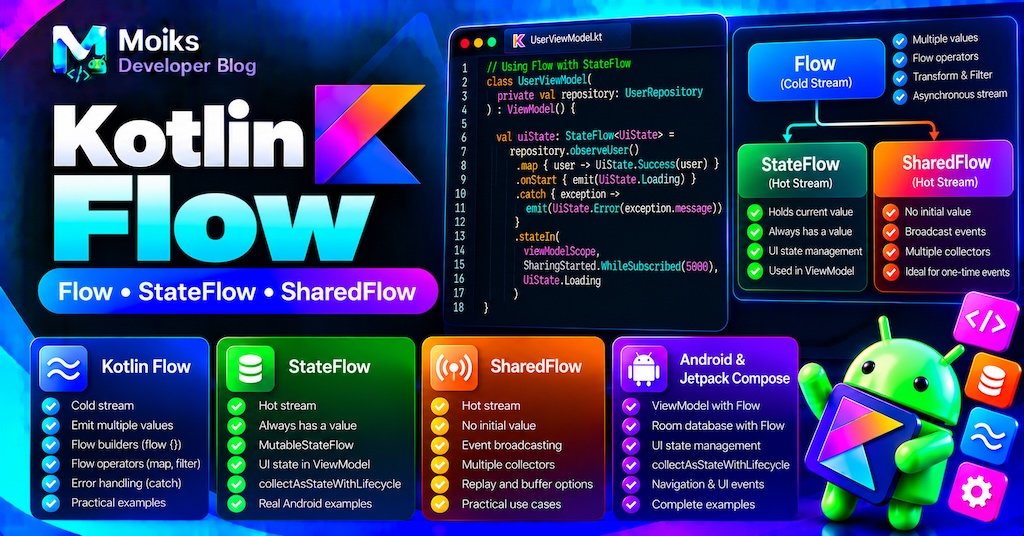
Modern Android applications constantly receive and process changing data.
For example:
- A user updates application settings.
- A database emits new records.
- A download reports its progress.
- A search field receives new input.
- A network operation returns updated information.
- A ViewModel updates screen state.
- A shopping cart total changes.
- A notification event occurs.
Handling these changes efficiently is essential for creating responsive Android applications.
Kotlin provides Flow, a coroutine-based API for working with asynchronous streams of values.
Flow is widely used with Kotlin Coroutines, Room Database, ViewModel, StateFlow, SharedFlow, and Jetpack Compose.
In this tutorial, we’ll explore Kotlin Flow from the fundamentals to practical Android development examples.
What You’ll Learn
By the end of this tutorial, you’ll understand:
- What Kotlin Flow is
- Why Android applications use Flow
- Flow vs suspend functions
- Cold and hot streams
- Creating Flow using
flow { } emit()andcollect()flowOf()andasFlow()- Flow operators
map(),filter(), andtake()onEach()catch()flowOn()combine()StateFlowMutableStateFlowSharedFlowMutableSharedFlow- StateFlow vs SharedFlow
- Flow with ViewModel
- Flow with Jetpack Compose
- Common mistakes and best practices
Let’s begin!
1. What Is Kotlin Flow?
Kotlin Flow is an asynchronous data stream API built on Kotlin Coroutines.
A Flow can emit multiple values over time.
Example
fun getNumbers(): Flow<Int> = flow {

    emit(10)

    emit(20)

    emit(30)
}
The Flow emits three values:
10
20
30
Unlike a regular function that returns a single result, Flow can produce a sequence of values.
Real-World Examples
Flow is useful for:
- Observing Room database changes
- Monitoring application settings
- Tracking download progress
- Processing search queries
- Observing UI state
- Receiving live data updates
2. Kotlin Flow vs Suspend Functions
Both Flow and suspend functions work with Kotlin Coroutines, but they serve different purposes.
Suspend Function
suspend fun getUsername(): String {

    delay(1000)

    return "Alex"
}
This function returns one username.
Flow Function
fun getUsernames(): Flow<String> = flow {

    emit("Alex")

    delay(1000)

    emit("John")

    delay(1000)

    emit("Emma")
}
This Flow emits multiple values.
Comparison
| Feature | Suspend Function | Flow |
|---|---|---|
| Return values | Usually one result | Multiple values |
| Asynchronous support | Yes | Yes |
| Stream processing | Not directly | Yes |
| Operators | Not Flow operators | map, filter, combine, etc. |
| Typical use | API request | Observable data stream |
When to Use Flow
Use Flow when the caller needs to observe a sequence of values or updates over time.
For a simple one-time operation, a suspend function is often sufficient.
3. Add Kotlin Flow to an Android Project
Kotlin Flow is included in the kotlinx.coroutines library.
For Android development, add the appropriate coroutine dependency.
Gradle Dependency
dependencies {

    implementation(
        "org.jetbrains.kotlinx:kotlinx-coroutines-android:<compatible-version>"
    )
}
Replace the placeholder with a compatible stable version.
For modern Android projects, a Gradle Version Catalog is recommended for managing dependencies.
Common Imports
import kotlinx.coroutines.delay
import kotlinx.coroutines.flow.Flow
import kotlinx.coroutines.flow.flow
import kotlinx.coroutines.flow.emitAll
import kotlinx.coroutines.flow.collect
import kotlinx.coroutines.flow.flowOf
import kotlinx.coroutines.flow.asFlow
import kotlinx.coroutines.runBlocking
Only import the functions required by each example.
4. Creating Your First Kotlin Flow
Let’s create a simple Flow that emits numbers.
fun numberFlow(): Flow<Int> = flow {

    emit(1)

    emit(2)

    emit(3)
}
Collecting the Flow
fun main() = runBlocking {

    numberFlow().collect { number ->

        println(number)
    }
}
Output
1
2
3
Explanation
The flow { } builder creates a Flow.
The emit() function sends values downstream.
The collect() function receives emitted values.
Important
A Flow created with the standard flow { } builder is cold by default.
Its code does not execute until a collector starts collecting it.
5. Understanding Cold Flow
A cold Flow starts its upstream execution separately for each collector.
Example
fun coldFlow(): Flow<Int> = flow {

    println("Flow started")

    emit(10)

    emit(20)
}
Usage
fun main() = runBlocking {

    coldFlow().collect {
        println("Collector 1: $it")
    }

    coldFlow().collect {
        println("Collector 2: $it")
    }
}
Output
Flow started
Collector 1: 10
Collector 1: 20
Flow started
Collector 2: 10
Collector 2: 20
Explanation
Each collector triggers a new execution of the cold Flow.
This behavior is useful when every collector should independently execute the upstream operation.
Common Cold Flow Sources
flow { }flowOf()asFlow()- Many repository Flows
- Room DAO queries returning Flow
6. Creating Flow with flowOf()
The flowOf() function creates a Flow from predefined values.
Example
fun main() = runBlocking {

    val numbers = flowOf(
        10,
        20,
        30,
        40
    )

    numbers.collect { number ->

        println(number)
    }
}
Output
10
20
30
40
When to Use flowOf()
Use it when you already have a fixed collection of values to emit.
7. Creating Flow with asFlow()
The asFlow() extension converts supported collections, ranges, and other sources into a Flow.
Example
fun main() = runBlocking {

    val numbers = listOf(
        1,
        2,
        3,
        4,
        5
    )

    numbers.asFlow().collect {

        println(it)
    }
}
Output
1
2
3
4
5
Explanation
The list is converted into a Flow.
Each element is emitted to the collector.
8. Emitting Values with Delays
Flow can emit values over time using suspend functions.
Example
fun countdownFlow(): Flow<Int> = flow {

    for (number in 5 downTo 1) {

        emit(number)

        delay(1000)
    }
}
Usage
fun main() = runBlocking {

    countdownFlow().collect {

        println("Countdown: $it")
    }
}
Output
Countdown: 5
Countdown: 4
Countdown: 3
Countdown: 2
Countdown: 1
Each value is emitted approximately one second apart.
Practical Uses
This pattern is useful for:
- Countdown timers
- Simulated download progress
- Periodic status updates
- Step-by-step background processing
9. Kotlin Flow Operators
Flow provides operators for transforming and processing emitted values.
Common operators include:
map()filter()take()onEach()catch()combine()distinctUntilChanged()debounce()flatMapLatest()
Let’s explore several important operators.
10. Kotlin Flow map()
The map() operator transforms each emitted value.
Example
fun main() = runBlocking {

    flowOf(1, 2, 3, 4)
        .map { number ->

            number * 10
        }
        .collect {

            println(it)
        }
}
Output
10
20
30
40
Explanation
Each number is multiplied by 10 before reaching the collector.
Practical Uses
Use map for:
- Converting API models into UI models
- Formatting database values
- Transforming numeric data
- Mapping domain objects
11. Kotlin Flow filter()
The filter() operator emits only values that satisfy a condition.
Example
fun main() = runBlocking {

    flowOf(1, 2, 3, 4, 5, 6)
        .filter { number ->

            number % 2 == 0
        }
        .collect {

            println(it)
        }
}
Output
2
4
6
Explanation
Only even numbers pass through the filter.
Practical Uses
- Filtering search results
- Selecting active users
- Processing valid records
- Ignoring irrelevant events
12. Kotlin Flow take()
The take() operator limits the number of emitted values.
Example
fun main() = runBlocking {

    (1..10)
        .asFlow()
        .take(3)
        .collect {

            println(it)
        }
}
Output
1
2
3
Explanation
Only the first three values are collected.
Once the requested number of values has been received, upstream collection stops.
13. Kotlin Flow onEach()
The onEach() operator performs an action for every emitted value without changing the value.
Example
fun main() = runBlocking {

    flowOf(10, 20, 30)
        .onEach { value ->

            println("Processing: $value")
        }
        .collect { value ->

            println("Collected: $value")
        }
}
Output
Processing: 10
Collected: 10
Processing: 20
Collected: 20
Processing: 30
Collected: 30
Practical Uses
- Debug logging
- Observing intermediate values
- Performing lightweight side effects
Avoid putting expensive blocking work directly inside onEach when collecting on the main dispatcher.
14. Kotlin Flow catch()
The catch() operator handles exceptions thrown by upstream Flow operations.
Example
fun errorFlow(): Flow<Int> = flow {

    emit(10)

    emit(20)

    throw IllegalStateException(
        "Something went wrong"
    )
}
Collecting with catch()
fun main() = runBlocking {

    errorFlow()
        .catch { exception ->

            println(
                "Error: ${exception.message}"
            )
        }
        .collect {

            println(it)
        }
}
Output
10
20
Error: Something went wrong
Important
The catch operator handles upstream exceptions.
It does not automatically catch exceptions thrown inside the downstream collect block.
Also, coroutine cancellation should not be converted into an ordinary application error.
15. Kotlin Flow flowOn()
The flowOn() operator changes the execution context of upstream Flow operations.
Example
fun calculateFlow(): Flow<Int> = flow {

    for (number in 1..5) {

        emit(number * number)
    }

}.flowOn(Dispatchers.Default)
Usage
fun main() = runBlocking {

    calculateFlow().collect {

        println(it)
    }
}
Output
1
4
9
16
25
Explanation
The upstream calculation runs using Dispatchers.Default.
The downstream collector continues in its own coroutine context.
Best Practice
Use flowOn for appropriate upstream execution context changes.
Avoid manually switching context inside a standard flow builder to emit from another coroutine context.
16. Kotlin Flow combine()
The combine() operator combines the latest values from multiple Flows.
Example
fun main() = runBlocking {

    val firstName = flowOf("Alex")

    val lastName = flowOf("Johnson")

    combine(
        firstName,
        lastName
    ) { first, last ->

        "$first $last"

    }.collect {

        println(it)
    }
}
Output
Alex JohnsonPractical Uses
combine is useful for:
- Combining user preferences
- Calculating form validity
- Combining database results
- Building dashboard state
- Updating derived UI information
17. Understanding Hot Flow
Unlike a typical cold Flow, a hot Flow exists independently of individual collectors.
Kotlin provides hot stream APIs including:
- StateFlow
- SharedFlow
Cold vs Hot Flow
| Feature | Cold Flow | Hot Flow |
|---|---|---|
| Starts per collector | Usually yes | No |
| Shares emissions | Not by default | Yes |
| Maintains current state | Not necessarily | StateFlow does |
| Multiple collectors | Separate upstream execution | Can observe shared source |
| Typical use | Data pipeline | UI state and events |
Important
StateFlow and SharedFlow have different replay and state semantics.
They should not be treated as interchangeable.
18. What Is StateFlow?
StateFlow is a hot Flow that represents observable state.
It always has a current value.
Example
val counter = MutableStateFlow(0)The initial value is 0.
We can update it:
counter.value = 10Reading the Value
println(counter.value)Output
10Why Use StateFlow?
StateFlow is useful for:
- Screen UI state
- Loading indicators
- User profile state
- Selected filters
- Form state
- Application settings
- Dashboard information
19. MutableStateFlow vs StateFlow
MutableStateFlow allows state updates.
StateFlow provides a read-only interface for observing state.
Example
class CounterViewModel : ViewModel() {

    private val _count = MutableStateFlow(0)

    val count: StateFlow<Int> =
        _count.asStateFlow()

    fun increment() {

        _count.value += 1
    }
}
Explanation
The ViewModel owns the mutable state.
Other components can observe the read-only StateFlow.
Best Practice
Expose StateFlow publicly and keep MutableStateFlow private.
This prevents external components from changing ViewModel state directly.
20. StateFlow in Jetpack Compose
Jetpack Compose can observe StateFlow and update the UI automatically.
ViewModel
class CounterViewModel : ViewModel() {

    private val _count = MutableStateFlow(0)

    val count: StateFlow<Int> =
        _count.asStateFlow()

    fun increment() {

        _count.value += 1
    }
}
Compose Screen
@Composable
fun CounterScreen(
    viewModel: CounterViewModel = viewModel()
) {

    val count by viewModel.count
        .collectAsStateWithLifecycle()

    Column(
        modifier = Modifier
            .fillMaxSize()
            .padding(24.dp),
        verticalArrangement = Arrangement.Center,
        horizontalAlignment = Alignment.CenterHorizontally
    ) {

        Text(
            text = "Counter: $count",
            style = MaterialTheme.typography.headlineMedium
        )

        Spacer(
            modifier = Modifier.height(16.dp)
        )

        Button(
            onClick = {
                viewModel.increment()
            }
        ) {

            Text("Increment")
        }
    }
}
Explanation
The Compose screen collects StateFlow using collectAsStateWithLifecycle().
When the count changes, Compose updates the displayed value.
Why Use collectAsStateWithLifecycle()?
It integrates Flow collection with Android lifecycle awareness.
For Android screens, this is generally preferred over collecting StateFlow without lifecycle awareness.
21. What Is SharedFlow?
SharedFlow is a hot Flow designed for broadcasting values to multiple collectors.
Unlike StateFlow, SharedFlow does not require an initial value.
Example
val events = MutableSharedFlow<String>()Emitting an Event
events.emit("User logged in")Collecting Events
events.collect { event ->

    println(event)
}
Practical Uses
SharedFlow can be useful for:
- Application-wide event streams
- Broadcasting updates
- Notification events
- Shared signals between components
Important
A default MutableSharedFlow has no replay cache.
Values emitted when there are no subscribers are not retained for future collectors.
This behavior matters when using SharedFlow for one-time UI events.
22. MutableSharedFlow Example
Let’s create a simple event stream.
fun main() = runBlocking {

    val events = MutableSharedFlow<String>()

    val collectorJob = launch {

        events.collect { event ->

            println("Received: $event")
        }
    }

    collectorJob.start()

    events.subscriptionCount.first {
        it > 0
    }

    events.emit("Download started")

    events.emit("Download completed")

    collectorJob.cancelAndJoin()
}
Output
Received: Download started
Received: Download completed
Explanation
The collector starts observing SharedFlow.
We wait until a subscriber is registered.
Then we emit two events.
Both events are received by the active collector.
Important
Unlike a cold Flow, a SharedFlow does not complete automatically.
Collectors normally continue until their coroutine is cancelled.
23. StateFlow vs SharedFlow
Both are hot Flows, but they serve different purposes.
| Feature | StateFlow | SharedFlow |
|---|---|---|
| Initial value required | Yes | No |
| Current value available | Yes | Not through a value property |
| Replays latest value | Yes | Configurable |
| Duplicate equal values | Conflated | Depends on configuration |
| Main purpose | Observable state | Broadcast stream |
| Typical Android use | Screen state | Shared events |
Use StateFlow For
- Loading state
- User information
- Selected tab
- Form state
- Screen data
- Settings state
Use SharedFlow For
- Broadcasting events
- Shared notifications
- Multiple subscribers receiving updates
Important
For critical one-time UI actions, consider whether a durable state-based approach or event queue is more appropriate.
SharedFlow does not guarantee delivery to collectors that are not active unless replay is configured, and replay can introduce duplicate handling.
24. Practical Android Example: User Profile Repository
Let’s create a repository that emits a user profile using Flow.
Step 1: Create User Model
data class User(
    val id: Int,
    val name: String,
    val email: String
)
Step 2: Create Repository
class UserRepository {

    fun getUser(): Flow<User> = flow {

        delay(1500)

        emit(
            User(
                id = 101,
                name = "Alex",
                email = "alex@example.com"
            )
        )
    }
}
Explanation
The repository returns Flow<User>.
It simulates a delay and then emits a User object.
In a real Android application, this could represent database updates or a sequence of network-driven updates.
25. Create UI State
A modern Android screen should represent loading, success, and error states explicitly.
sealed interface UserUiState {

    data object Loading : UserUiState

    data class Success(
        val user: User
    ) : UserUiState

    data class Error(
        val message: String
    ) : UserUiState
}
Explanation
The UI can display different content based on the current state.
This pattern works well with ViewModel, StateFlow, and Jetpack Compose.
26. Create ViewModel with Flow and StateFlow
class UserViewModel : ViewModel() {

    private val repository = UserRepository()

    private val _uiState =
        MutableStateFlow<UserUiState>(
            UserUiState.Loading
        )

    val uiState: StateFlow<UserUiState> =
        _uiState.asStateFlow()

    init {
        loadUser()
    }

    fun loadUser() {

        viewModelScope.launch {

            _uiState.value = UserUiState.Loading

            repository.getUser()
                .catch { exception ->

                    _uiState.value =
                        UserUiState.Error(
                            "Unable to load user"
                        )
                }
                .collect { user ->

                    _uiState.value =
                        UserUiState.Success(user)
                }
        }
    }
}
Explanation
The ViewModel collects the repository Flow.
When data arrives, it updates StateFlow.
The Compose screen observes the updated state.
Production Note
The example keeps the architecture simple for learning.
In a production application, consider dependency injection, appropriate error classification, cancellation of previous requests, and unit testing.
27. Jetpack Compose User Profile Screen
Let’s display the user profile using Material 3.
@Composable
fun UserProfileScreen(
    viewModel: UserViewModel = viewModel()
) {

    val uiState by viewModel.uiState
        .collectAsStateWithLifecycle()

    Column(
        modifier = Modifier
            .fillMaxSize()
            .padding(24.dp),
        verticalArrangement = Arrangement.Center,
        horizontalAlignment = Alignment.CenterHorizontally
    ) {

        when (val state = uiState) {

            UserUiState.Loading -> {

                CircularProgressIndicator()

                Spacer(
                    modifier = Modifier.height(16.dp)
                )

                Text("Loading user...")
            }

            is UserUiState.Success -> {

                Text(
                    text = state.user.name,
                    style = MaterialTheme.typography.headlineMedium
                )

                Spacer(
                    modifier = Modifier.height(8.dp)
                )

                Text(state.user.email)

                Spacer(
                    modifier = Modifier.height(16.dp)
                )

                Button(
                    onClick = {
                        viewModel.loadUser()
                    }
                ) {

                    Text("Reload")
                }
            }

            is UserUiState.Error -> {

                Text(
                    text = state.message,
                    color = MaterialTheme.colorScheme.error
                )

                Spacer(
                    modifier = Modifier.height(16.dp)
                )

                Button(
                    onClick = {
                        viewModel.loadUser()
                    }
                ) {

                    Text("Retry")
                }
            }
        }
    }
}
Required Imports
import androidx.compose.foundation.layout.Arrangement
import androidx.compose.foundation.layout.Column
import androidx.compose.foundation.layout.Spacer
import androidx.compose.foundation.layout.fillMaxSize
import androidx.compose.foundation.layout.height
import androidx.compose.foundation.layout.padding
import androidx.compose.material3.Button
import androidx.compose.material3.CircularProgressIndicator
import androidx.compose.material3.MaterialTheme
import androidx.compose.material3.Text
import androidx.compose.runtime.Composable
import androidx.compose.runtime.getValue
import androidx.compose.ui.Alignment
import androidx.compose.ui.Modifier
import androidx.compose.ui.unit.dp
import androidx.lifecycle.ViewModel
import androidx.lifecycle.viewModelScope
import androidx.lifecycle.viewmodel.compose.viewModel
import androidx.lifecycle.compose.collectAsStateWithLifecycle
import kotlinx.coroutines.delay
import kotlinx.coroutines.flow.Flow
import kotlinx.coroutines.flow.MutableStateFlow
import kotlinx.coroutines.flow.StateFlow
import kotlinx.coroutines.flow.asStateFlow
import kotlinx.coroutines.flow.catch
import kotlinx.coroutines.flow.collect
import kotlinx.coroutines.flow.flow
import kotlinx.coroutines.launch
Expected UI — Loading
+--------------------------------+
|                                |
|          Loading...            |
|                                |
|       Loading user...          |
|                                |
+--------------------------------+
Expected UI — Success
+--------------------------------+
|                                |
|             Alex               |
|                                |
|       alex@example.com         |
|                                |
|          [ Reload ]            |
|                                |
+--------------------------------+
Expected UI — Error
+--------------------------------+
|                                |
|      Unable to load user       |
|                                |
|           [ Retry ]            |
|                                |
+--------------------------------+
How It Works
Repository
Produces a Flow containing user information.
ViewModel
Collects the Flow and updates StateFlow.
StateFlow
Exposes observable UI state.
Jetpack Compose
Observes state changes and updates the screen.
Retry Button
Starts another loading operation.
Important
Repeated Reload taps can create overlapping collectors in this simplified example.
For production applications, cancel the previous loading Job, disable repeated requests while loading, or use a reactive trigger with flatMapLatest.
28. Kotlin Flow with Room Database
One of the most common uses of Flow in Android is observing Room database changes.
Example DAO
@Dao
interface UserDao {

    @Query("SELECT * FROM users")
    fun observeUsers(): Flow<List<UserEntity>>
}
Explanation
Room returns a Flow of user records.
When the observed database tables change, Room can emit updated query results.
Repository Example
class UserRepository(
    private val userDao: UserDao
) {

    fun observeUsers(): Flow<List<UserEntity>> {

        return userDao.observeUsers()
    }
}
Why Is This Useful?
The UI can react automatically to database updates.
For example:
- User adds a record.
- Room database updates.
- Flow emits the new query result.
- ViewModel receives updated data.
- Jetpack Compose displays the latest information.
This creates a reactive data pipeline.
29. Common Kotlin Flow Mistakes
Mistake 1: Forgetting to Collect a Cold Flow
Creating a cold Flow does not execute its producer.
You must collect it or use another terminal operation.
Mistake 2: Collecting Flow Without Lifecycle Awareness
On Android screens, prefer lifecycle-aware collection such as collectAsStateWithLifecycle().
Mistake 3: Exposing MutableStateFlow Publicly
Keep mutable state private inside the ViewModel.
Expose StateFlow instead.
Mistake 4: Using SharedFlow for Every UI State
StateFlow is usually more appropriate for continuously observable screen state.
Mistake 5: Ignoring Cancellation
Flow collection follows coroutine cancellation.
Avoid swallowing cancellation exceptions.
Mistake 6: Performing Blocking Work on the Main Thread
Use appropriate dispatchers for expensive upstream operations.
Mistake 7: Launching Multiple Unmanaged Collectors
Repeatedly starting collectors can cause duplicate work and unexpected updates.
Mistake 8: Assuming SharedFlow Stores Every Event
SharedFlow replay and buffering depend on its configuration.
Events can be missed when no subscriber is active.
30. Kotlin Flow Best Practices
Follow these recommendations:
- Use Flow for observable asynchronous streams.
- Prefer suspend functions for simple one-time operations.
- Use StateFlow for screen UI state.
- Use SharedFlow when broadcasting events is appropriate.
- Keep MutableStateFlow private.
- Use collectAsStateWithLifecycle() in Android Compose screens.
- Handle errors at meaningful boundaries.
- Preserve coroutine cancellation.
- Use flowOn() for appropriate upstream dispatcher changes.
- Avoid unnecessary collectors.
- Use structured concurrency.
- Prefer immutable UI state models.
- Test Flow emissions and cancellation behavior.
- Use Room Flow queries for reactive database updates.
- Keep UI and data layers separate.
These practices help build scalable and maintainable Android applications.
31. Kotlin Flow Quick Reference
| Concept | Purpose |
|---|---|
| Flow | Asynchronous stream of values |
| flow { } | Create a cold Flow |
| emit() | Emit a value |
| collect() | Receive emitted values |
| flowOf() | Create Flow from values |
| asFlow() | Convert supported sources to Flow |
| map() | Transform values |
| filter() | Filter values |
| take() | Limit emissions |
| onEach() | Perform an action per emission |
| catch() | Handle upstream exceptions |
| flowOn() | Change upstream execution context |
| combine() | Combine latest values |
| StateFlow | Observable state holder |
| MutableStateFlow | Mutable observable state |
| SharedFlow | Hot broadcast stream |
| MutableSharedFlow | Mutable shared stream |
| collectAsStateWithLifecycle() | Lifecycle-aware Compose collection |
32. Practical Exercises
Try these exercises to improve your Flow skills.
Exercise 1: Basic Flow
Create a Flow that emits numbers from 1 to 10.
Exercise 2: Delayed Emissions
Emit five messages with a one-second delay between each.
Exercise 3: map()
Transform numbers into their squares.
Exercise 4: filter()
Filter even numbers from a Flow.
Exercise 5: take()
Collect only the first three values.
Exercise 6: catch()
Create a Flow that throws an exception and handle it.
Exercise 7: StateFlow
Create a counter ViewModel using MutableStateFlow.
Exercise 8: SharedFlow
Create an event stream that broadcasts download status messages.
Exercise 9: Jetpack Compose
Build a screen that observes StateFlow and updates automatically.
Exercise 10: Room Integration
Create a Room DAO that returns Flow<List<Entity>>.
Observe database changes in a ViewModel.
33. Frequently Asked Questions
What is Kotlin Flow?
Kotlin Flow is a coroutine-based API for representing asynchronous streams of values.
What is the difference between Flow and StateFlow?
Flow is a general stream abstraction.
StateFlow is a hot Flow that always holds a current value.
What is the difference between StateFlow and SharedFlow?
StateFlow represents observable state with a current value.
SharedFlow broadcasts values and supports configurable replay and buffering.
Is Kotlin Flow cold or hot?
Flow created using standard builders such as flow { } is typically cold.
StateFlow and SharedFlow are hot.
Can I use Flow with Jetpack Compose?
Yes. Flow is commonly used with ViewModel, StateFlow, and collectAsStateWithLifecycle().
Does Flow replace LiveData?
StateFlow and Flow are widely used alternatives to LiveData in modern Android applications.
However, LiveData remains supported and can still be appropriate in existing projects.
Can Room return Flow?
Yes. Room DAO queries can return Flow to observe database changes.
Can Flow emit multiple values?
Yes. A Flow can emit multiple values over time.
Should I use SharedFlow for navigation events?
SharedFlow can be used for events, but developers should carefully consider lifecycle behavior and potential event loss.
For important navigation or user-action outcomes, a state-based approach may be more reliable.
What is the best way to collect StateFlow in Compose?
For Android applications, collectAsStateWithLifecycle() is generally recommended.
What We’ve Learned
In this tutorial, we learned:
- Kotlin Flow fundamentals
- Flow vs suspend functions
- Cold and hot streams
- flow builder
- emit and collect
- flowOf and asFlow
- Flow operators
- map, filter, and take
- onEach and catch
- flowOn and combine
- StateFlow
- MutableStateFlow
- SharedFlow
- MutableSharedFlow
- StateFlow vs SharedFlow
- ViewModel integration
- Jetpack Compose integration
- Room database integration
- Common mistakes
- Best practices
Kotlin Flow is an essential tool for building reactive Android applications.
By combining Flow, StateFlow, ViewModel, and Jetpack Compose, developers can build applications that respond efficiently to changing data.
Understanding these concepts provides a strong foundation for advanced Android architecture, database integration, networking, and modern UI development.
What’s Next?
In our next tutorial, we’ll explore:
Kotlin Flow Operators Explained: map, filter, combine, debounce & flatMapLatest
You’ll learn:
- Flow transformation operators
- map and mapLatest
- filter
- distinctUntilChanged
- debounce
- combine
- zip
- flatMapConcat
- flatMapMerge
- flatMapLatest
- collectLatest
- Search-as-you-type implementation
- Practical Android and Jetpack Compose examples
Happy Coding!
Continue learning modern Android development with Moiks Developer Blog.


